# 1. Instrument and Audio FX MP Host plugins

<span dir="ltr">The MP Controller hardware communicates directly with the MP Host plugin, not with the DAW.</span>

That is why it is important to disable the MIDI IN/OUT for C1-xMP1 in your DAW. C1-xMP1 is the MP Controller’s MIDI hardware.

There are 2 versions of the single MPH plugin and 2 versions of the multi host plugin. Instrument and Audio Effect.

---

##### The MPH single and multi host plugin can host the following plugin formats

On Windows: VST2 and VST3. On Mac: AU, VST2, VST3.

The MPH single and Multi host exists in the following formats:

On Windows: VST3 and AAX. On Mac: AU, VST3 and AAX.

---

##### Windows: The installer automatically copies the plugins to their folders, respectively

VST3: C:\\Program Files\\Common Files\\VST3

AAX: C:\\Program Files\\Common Files\\Avid\\Audio\\Plug-Ins

<p class="callout info"><span dir="ltr">For Windows, it is a good practice to install the C++ Redistributables from Microsoft before installing, from</span> [**<u>here</u>**](https://aka.ms/vs/17/release/vc_redist.x64.exe)<span dir="ltr">.</span></p>

---

##### <span dir="ltr">MP Host Audio Effect and Instrument locations on the Mac</span>

On the Mac the installer automatically copies AU, VST3 and AAX plugins to their folders, respectively.

AU (.component files): /Library/Audio/Plug-Ins/Components/

VST3: /Library/Audio/Plug-Ins/VST3/

AAX: /Library/Application Support/Avid/Audio/Plug-Ins

<p class="callout info">There are 2 Library folders on the MAC OS one is under   
/Library and the other ~/Library which means under your user account.   
You need to visit the ~/Library/Application Support/MP/Host</p>

<span dir="ltr" style="color: rgb(0, 0, 0);">MP Host receives and sends the following from the DAW</span>

<span style="color: rgb(0, 0, 0);">**Audio FX version:** </span>

1. <span style="color: rgb(0, 0, 0);">Receives audio and passes the audio to the hosted plugin in MPH. In turn, it outputs audio to the DAW. </span>
2. <span style="color: rgb(0, 0, 0);">If the hosted third party plugin introduces latency, the MPH passes this latency to the DAW, allowing your DAW to compensate for the latency introduced by the MPH plugin.</span>
3. <span style="color: rgb(0, 0, 0);">DAW tempo is received from any MPH instance, so in the case you are hosting a plugin that needs the tempo information from the DAW, like a tempo delay plugin, it will receive it from the DAW.</span>
4. <span style="color: rgb(0, 0, 0);">Receives automation from the DAW and passes it to the MPH’s 128 encoders. More on automation below.</span>

<span style="color: rgb(0, 0, 0);">**Instrument version:**</span>

1. <span dir="ltr" style="color: rgb(0, 0, 0);">Receives midi notes (played from a midi controller or recorded) from the DAW.</span>
2. <span dir="ltr" style="color: rgb(0, 0, 0);">If the hosted third party plugin introduces latency, the MPH passes this latency to the DAW, allowing your DAW to compensate for the latency introduced by the MPH plugin.</span>
3. <span style="color: rgb(0, 0, 0);">DAW tempo and passes it to the hosted instrument.</span>
4. <span dir="ltr" style="color: rgb(0, 0, 0);">Receives automation from the DAW and passes it to the MPH’s encoders.  
      
    </span>
5. <span dir="ltr" style="color: rgb(0, 0, 0);">Outputs audio generated by the hosted plugin to the DAW</span>

---

##### <span style="color: rgb(0, 0, 0);"><span dir="ltr">Plugins that can be controlled with the MP Controller</span></span>

<span style="color: rgb(0, 0, 0);">You can control all VST2/VST3/AU plugins’ parameters that can be automated by the DAW. </span>

<span style="color: rgb(0, 0, 0);">If a plugin has parameters but these cannot be automated by the DAW, then these parameters cannot be controlled by MP Host and controller. </span>

<span dir="ltr" style="color: rgb(0, 0, 0);">The MP Controller is not using CCs to control parameters, it uses the same method that the DAW uses to automate/control parameters. This is called the automation method.</span>

<span dir="ltr" style="color: rgb(0, 0, 0);">After version v1.5-89f683b--H2021-09-23--B2021-09-24, the MP Host can also transmit CC messages to the hosted plugin.</span>

<span dir="ltr" style="color: rgb(0, 0, 0);">The CC method is one way, only for sending CC to the plugin. The method of using automatable parameters allows complete bidirectional control and it is recommended. This is the method used when you link a parameter to an encoder.</span>

##### <span style="color: rgb(0, 0, 0);">Incompatible Plugin Type Warning</span>

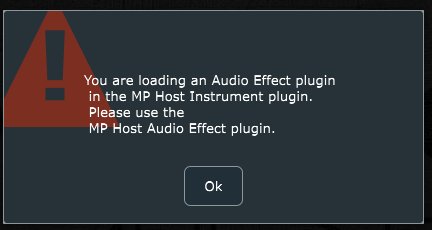
<span style="color: rgb(0, 0, 0);">While trying to load up a plugin, if you get a pop up warning message that says that the plugin you are trying to load is not compatible, this is because you are trying to load an instrument plugin in an audio effect MP Host or the opposite. You can only load plugins effects in the MP Audio effect host plugin and only instruments in the MP Instrument host plugin.</span>

<span style="color: rgb(0, 0, 0);">[![image.png](https://kb.mpmidi.com/storage/uploads/images/gallery/2025-04/1745497250-8gItiRSRhmF7SH8a.jpg)](http://kb.mpmidi.com/storage/uploads/images/gallery/2025-04/image.png)</span>

---

##### <span dir="ltr" style="color: rgb(0, 0, 0);">Set a title to the pages</span>

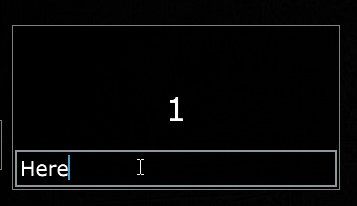
<span dir="ltr" style="color: rgb(0, 0, 0);">To set a title to the pages you need to right click in the lower area of the page button</span>

<span dir="ltr" style="color: rgb(0, 0, 0);">![](https://kb.mpmidi.com/storage/uploads/images/gallery/2025-04/1745497251-vbLsVFZ9GVjGaVGt.jpg)</span>

---

##### <span dir="ltr" style="color: rgb(0, 0, 0);">Opening and closing the MP Host plugin - Single and Multi Host</span>

<table id="bkmrk--13"><tbody><tr><td><span style="color: rgb(0, 0, 0);">![](https://kb.mpmidi.com/storage/uploads/images/gallery/2025-04/1745497251-xr5KEXZXZkNhQvGa.jpg)</span></td><td><span style="color: rgb(0, 0, 0);">![](https://kb.mpmidi.com/storage/uploads/images/gallery/2025-04/1745497251-uS75TZ3KK2Ur69UQ.jpg)</span></td></tr></tbody></table>

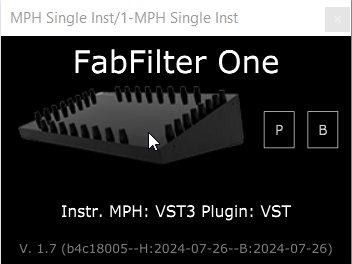
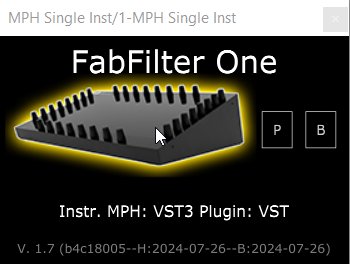
<span data-identifyelement="567" dir="ltr" style="color: rgb(0, 0, 0);">With MPH, you can control what you see on the controller’s screen. When you press the Control and Display button of an MPH (the Controller icon), the control is transferred to that selected MPH instance. The controller icon gets a yellow highlight and it means this is an MPH instance that interacts with the controller. When you click on another MPH instance, the button gets a yellow highlight and the controller is now interacting with that selected MPH instance. </span>

<span data-identifyelement="567" dir="ltr" style="color: rgb(0, 0, 0);">When you close the MPH plugin small window, the MPH stops receiving any communication with the controller.</span>

<span data-identifyelement="567" dir="ltr" style="color: rgb(0, 0, 0);">![](https://kb.mpmidi.com/storage/uploads/images/gallery/2025-04/1745497251-Kh3q73CyrPvP3mh0.png)</span>

<span data-identifyelement="570" dir="ltr" style="color: rgb(0, 0, 0);">When you open a DAW project, the first time you open the MP Host plugin the small window will open and there will not be anything display on the controller's display until you click on the controller icon.</span>

<span data-identifyelement="570" dir="ltr" style="color: rgb(0, 0, 0);">This is only necessary **the first time** after opening a DAW project. **The rest of the times** when you open the MP Host plugin from the DAW it will automatically open the window on the controller and highlight the icon or the multihost slot that was selected last.![](https://kb.mpmidi.com/storage/uploads/images/gallery/2025-04/1745497252-p4vODhAie1eeNPOf.jpg)</span>

<span data-identifyelement="570" dir="ltr" style="color: rgb(0, 0, 0);"> ![](https://kb.mpmidi.com/storage/uploads/images/gallery/2025-04/1745497252-MmiV38AeVI0xPcMe.jpg)</span>

<span style="color: rgb(0, 0, 0);">Note that the MP Host does not interact with track selection of the DAW so it will not open a plugin when a track is selected.</span>

<span style="color: rgb(0, 0, 0);">If the DAW opens plugins upon selecting a track, (not just hiding and unhide them like Ableton does) then the MP Host will also open and it will display the hosted plugin.</span>