If the license manager fails on the mac because of a permissions error such as "need permission to write files" you can paste the following in a terminal and enter your password, and press enter: *mkdir -p ~/Library/Application\\ Support/MP/Host* *sudo chown $(whoami) ~/Library/Application\\ Support/MP/Host* *sudo chmod -R 777 ~/Library/Application\\ Support/MP/Host*
Alternatively, log on to the user portal and download the latest version of the MP Host plugin. Follow [this guide ](https://docs.google.com/presentation/d/1ID_cl5MIJIUqI522IW3qHU8w367s-BVqvCPpSYQ2-Q4/edit)to generate a license. > The **hardware.id** file is generated automatically when you run the MP Host plugin. This is the hardware id of your computer. > The **mph.license** file should be downloaded from the user portal. > Details on how to log in to the user portal have been emailed to you. First, ensure you have both files in the MP Host folder as shown here: 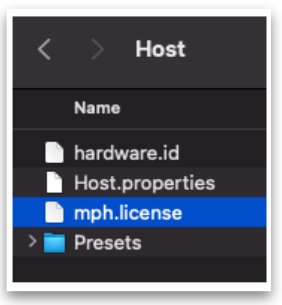Do not rename the hardware.id and mph.license files. If the filenames are not exactly as shown above, you will get the error "License not found"
**Hardware.id file is not being copied to the Mac's Desktop** If you are using the MP Controller for the first time on a Mac and the **hardware.id** file is **not** being copied to your Desktop when you click on the STEP 1 button in the license registration, click on the *Open the MP Host Folder* button on the Licence Management window. It will open the folder in your Mac's Finder. [](https://kb.mpmidi.com/uploads/images/gallery/2025-09/rWt3JLSn1og8Usc8-image.png) Close the DAW. *Alternatively you can open the following folder in Finder. On the top menu of the Finder on your Mac, choose Go > Go to Folder and paste this path: **~/Library/Application\\ Support/MP/Host* Once the folder is open, check if the hardware.id file present in the MP Host folder. If it is not present, strict permissions by MacOS may be the issue. Paste the following in a terminal: **sudo chmod 777 ~/Library/Application\\ Support/MP/Host** It will ask for your password and then enter. *The terminal should not produce any output. If it produces a message then there may something wrong with the command provided. Take a screenshot of the message and send it to us via email.* Then open you DAW and load the MPH Single plugin and follow the steps to complete the license generation/verification process by clicking on Step 1 button. Additionally, it is a good practice to add the DAW in System Settings > Privacy and Security > Full Disk Access. [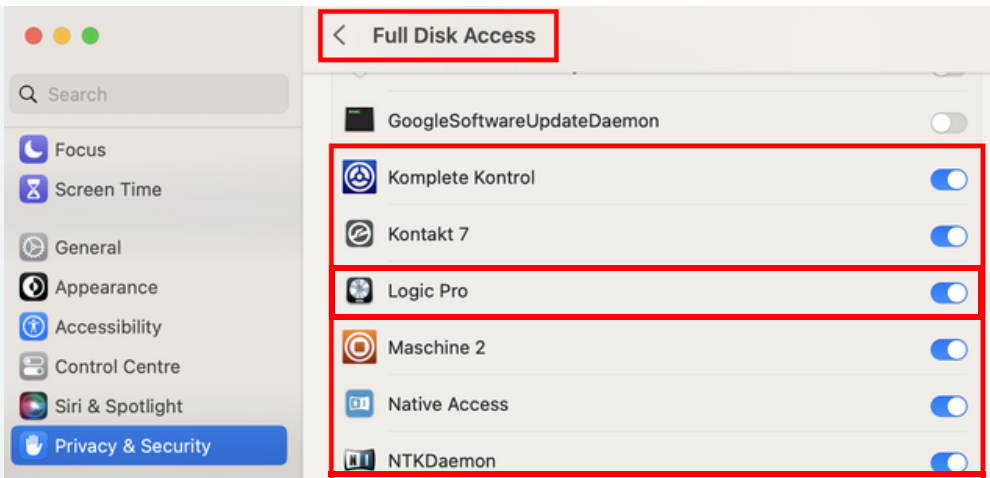](https://kb.mpmidi.com/uploads/images/gallery/2025-09/77QqRMEC7fnAAsjy-image.png) Note that without the mph.license file the MP Host plugin will not allow the hardware controller to be connected to the MP Host software and the encoders will not work.