# 2. MacOS Full screen mode and Window mode
The MP Host plugin can operate in Full screen mode and Windowed mode.
You can select this option from the right click menu
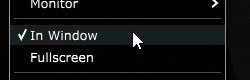
We recommend running the MP Host "In Window" mode and disable the MacOS top bar for secondary displays via Mission Control, Spaces. See how to do this [**here**](https://kb.mpmidi.com/books/mp-controller-documentation/page/4-mac-hide-the-macos-top-bar-from-the-mp-controller)
If Spaces is not disabled then "In Window" mode will show up the top bar of Mac OS on top of the MP Host window.

If you run the MP Host in Fullscreen mode, then the top bar will not show up on **any display.**