You don’t need to enter the controller serial again in the user portal.
To generate a new mph.license for another computer you need to log on the user portal from that new computer and choose one of the following methods to create your license: 1. Use the License Manager application (recommended) 2. Register via the MP Host plugin by uploading the new hardware.id file (generated when you run the MP Host) and download the mph.license file. ---First, download the latest version of the MP Host from the user portal and install it on your new computer. If you plan to use your older computer again do not delete the mph.license and hardware.id from the older computer. IT is ok to keep the files on both computers, given that they have been generated for those computers.
DO NOT USE HARDWARE.ID or MPH.LICENSE FILES FROM OTHER COMPUTERS. YOU NEED TO RUN THE MP HOST TO GENERATE NEW ONES. On the new computer, if you have copied the hardware.id and/or mph.license from another computer then **delete** the hardware.id file and mph.license from [/MP/Host folder](https://kb.mpmidi.com/books/mp-controller-documentation/page/4-show-preset-folder-go-to-the-mphost-properties-folder) See full path [here](https://kb.mpmidi.com/books/mp-controller-documentation/page/3-mp-host-properties-and-config-files) To generate a new license see the initial guide [here](https://docs.google.com/presentation/d/11dFAhWMQkr65AkyxNweT92F7MG87MP08B30MgXvg7-o/edit?slide=id.g37ff7b836b0_3_0#slide=id.g37ff7b836b0_3_0)
> **How to navigate to the MP/Host folder from the MP Host plugins and delete the hardware id:** > > - Open your DAW and load the Single FX or Instrument MP Host plugin. > Open the plugin and click on the Controller icon button to open the MP Host window on the MP controller. > - Right click on the main black area of the big window > - Select Presets > Show Presets Folder and it will open the MP/Host folder. See [here](https://kb.mpmidi.com/books/mp-controller-documentation/page/4-show-preset-folder-go-to-the-mphost-properties-folder) > - In that folder you will find the hardware.id file. Note that on the new computer if the hardware.id and mph.license are present, ie have been copied via time machine or hard drive transfer) **delete** the hardware.id and mph.license files > - Then run the MPH plugin in the DAW to generate a new hardware.id file. (remove and reload the MP Host plugin in the DAW if it is already loaded) > - Then login in your account and upload the new hardware.id to the server to get the new mph.license #### 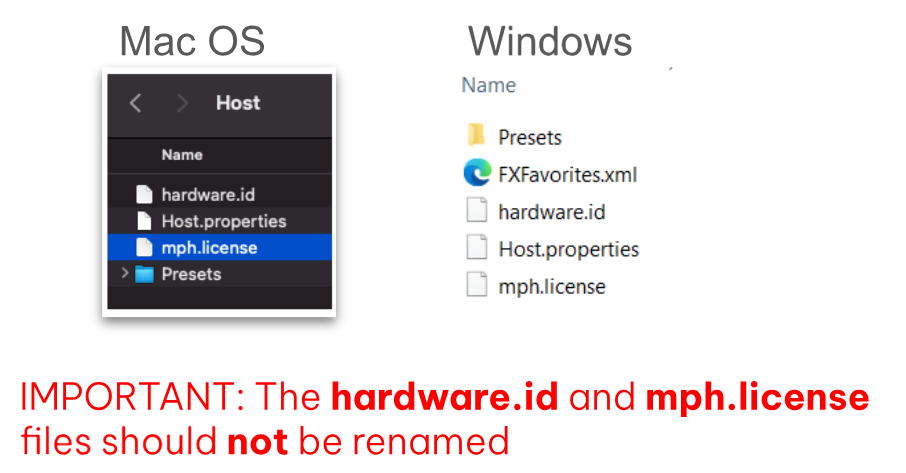 --- There is a limit on the activation server for 5 different computers. If you need activation for more computers, please [contact us](https://mpmidi.com/contactus).If you see the message “License not found, Controller Not connected” see [here](https://kb.mpmidi.com/books/mp-controller-documentation/page/2-mac-license-not-found).