# 6. Windows - License not found
**You can use the License Manager application (recommended) to create a new license. Download it from the user portal.**
Alternatively, log on to the user portal and download the latest version of the MP Host plugin.
Follow [this guide ](https://docs.google.com/presentation/d/1ID_cl5MIJIUqI522IW3qHU8w367s-BVqvCPpSYQ2-Q4/edit)to generate a license.
> The **hardware.id** file is generated automatically when you run the MP Host plugin. This is the hardware id of your computer.
> The **mph.license** file should be downloaded from the user portal.
> Details on how to log in to the user portal have been emailed to you.
The files should look like this in Windows file explorer:
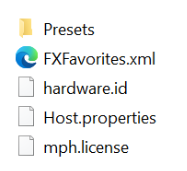
Do not rename any of the files above.
---
##### License not found due to non-latin characters
If you believe you are generating the license correctly as shown in your initial setup guide,
then the reason may be because of non-latin characters in your user name in Windows.
If your home folder has non-latin characters like (Ç, Ş, Ğ, I, İ, Ö, Ü) or other non-latin characters
for example C:\\Users\\Ümmet\\
This may prevent the MP Host from finding the license on your computer.
Paste your user path [here](https://pages.cs.wisc.edu/~markm/ascii.html) to check if you get a warning

To solve the issue, please create a Windows account that contains only Latin characters.
Please note that if there is a problem with the license, then it will not allow the hardware Controller to be connected to the MP Host.