# 7. Display restarts

##### <span data-identifyelement="496" dir="ltr"><span data-identifyelement="497"><span data-identifyelement="498" dir="ltr">MP Controller display restarts constantly (flickering)</span></span></span><span data-identifyelement="496" dir="ltr">  
  
</span>

The cause for this is that the monitor does not receive enough power.

<span data-identifyelement="507" dir="ltr">These steps may help to resolve the problem.</span>

<span data-identifyelement="655"><span data-identifyelement="656"><span data-identifyelement="508"><span data-identifyelement="657" dir="ltr">- use a different USB port from the computer that provides more power. </span></span></span></span>

<span data-identifyelement="659"><span data-identifyelement="660"><span data-identifyelement="509"><span data-identifyelement="661">- use shorter USB cables (1m recommended cables</span></span><span data-identifyelement="663"><span data-identifyelement="510"> </span><u data-identifyelement="664"><span data-identifyelement="665">[**<span data-identifyelement="511">here in section USB-C to USB-A</span>**](https://kb.mpmidi.com/books/mp-controller-documentation/page/6-cable-recommendations)</span></u><span data-identifyelement="512"> )</span></span></span></span>

<span data-identifyelement="669"><span data-identifyelement="670"><span data-identifyelement="513"><span data-identifyelement="671">- use a powered USB hub</span></span></span></span>

<span data-identifyelement="673"><span data-identifyelement="674"><span data-identifyelement="514"><span data-identifyelement="675">- use a</span></span><span data-identifyelement="676"><span data-identifyelement="515" dir="ltr"> [<span data-identifyelement="516">Y-cable</span>](https://kb.mpmidi.com/books/mp-controller-documentation/page/1-model-1a1a-using-a-y-cable-to-provide-more-power-to-the-display) </span><span data-identifyelement="515" dir="ltr">for Model 1A/1A+ </span></span></span></span>

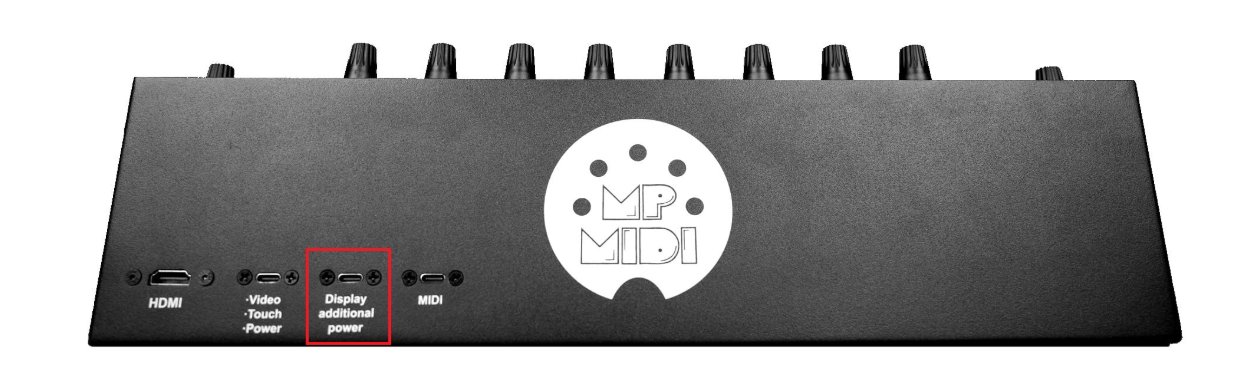
<span data-identifyelement="523" dir="ltr"><span data-identifyelement="527" dir="ltr">**For model 2A** you can use the additional power port to provide more power using a wall adapter 5V/2A minimum or a power bank as explained [**here**](https://kb.mpmidi.com/books/mp-controller-documentation/page/1-understanding-the-mp-midi-controller-ports)</span></span>

<span data-identifyelement="523" dir="ltr"><span data-identifyelement="527" dir="ltr">**![](/storage/uploads/images/gallery/2025-04/1745653906-NUHQBeSshKVmzbli.jpg)**</span>  
</span>

**For model 1A+ and model 2A** If when changing the brightness or switching to a preset with high brightness (such us the FPS) the monitor restarts, it means is not receiving enough power to support the level of brightness.

<span data-identifyelement="523" dir="ltr"><span data-identifyelement="530" dir="ltr">**For mode1 1A+** you also have the option to connect a wall adapter on the internal LCD board which has an additional USB-C port. To get to that port you have to unscrew the bottom cover.</span>  
  
<span data-identifyelement="535" dir="ltr">**For model 1A** use the </span><span data-identifyelement="537" dir="ltr">**[Y-cable](https://kb.mpmidi.com/books/mp-controller-documentation/page/1-model-1a1a-using-a-y-cable-to-provide-more-power-to-the-display)**</span></span><span data-identifyelement="523" dir="ltr"><span data-identifyelement="540"><span data-identifyelement="541" dir="ltr"> to provide additional power.</span></span></span>