
7. Mac - MP Touch Utility for moving the mouse cursor to the touch screen
MacOS does not support natively touch displays and it sees them as a mouse trackpad.
This means that when you touch the touch screen the mouse will move at the current location. If it is on your main monitor it will move the cursor there just like a mouse.
To address this problem we have created a small utility that takes the mouse cursor automatically to the controller's touch display when it detects a touch on the display.
The installer mpTouchUtility.pkg is in the zip file of the MP Host installer and can be downloaded from the user portal.
While this utility serves its purpose, UPDD provided by Touch Base for the MP Controller is a more advanced tool that offers many benefits and although it is optional we recommend it. See here
If you are already using UPDD you should not install this utility because it will conflict with UPDD. Uninstall UPDD and install this utility. The installer will not let you install it if UPDD exists on your computer.
How to install
Run the installer and enter your password when asked.
Click Allow when asked about System Events.
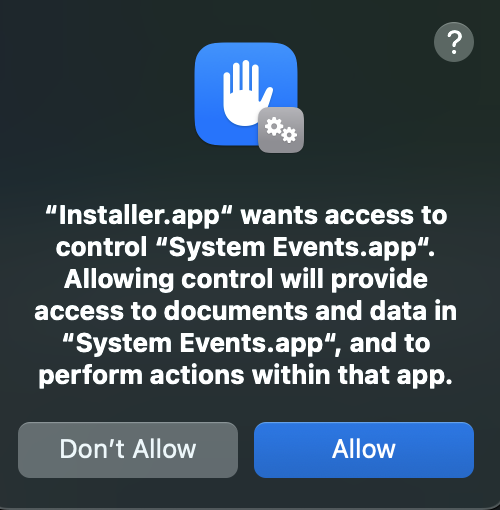
and then click OK
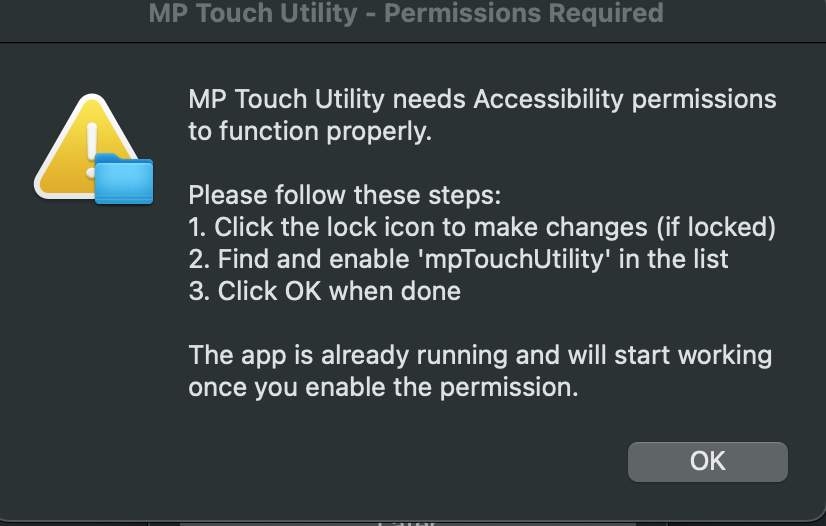
Enable it in Accessibility under Privacy and Security

The application should be running and there is a small icon on the top bar.
Click on the icon

Select the controller's display (it should be the last display on the list, 1920x1080)

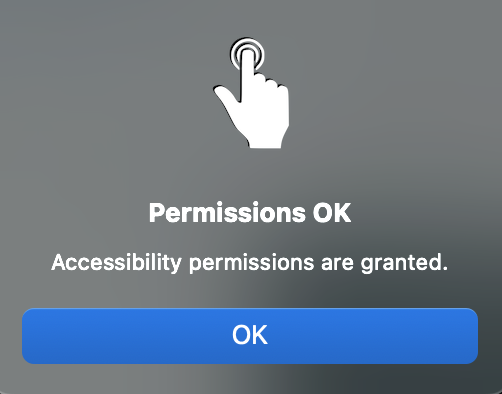
Click on Check Permissions, you should see a pop up window
To test it, tap once on the touch screen, you should see the mouse cursor go there at the center of the display.
From there you can use it normally on the touch screen.
If it does not work, quit the utility app and start it again from your Application's folder.

If you decide to get UPDD later on, you can run the uninstaller and install UPDD.