
MP Mix Placement Plugin - Documentation.
Part I - The idea, the research and the results
1. Motivation
A mix rarely fails because a single sound is bad. It fails because sounds compete: the guitars sit on the vocal's presence, the bass and the kick fight over the same low octave, the pads fill the stereo field so nothing else has a place, and everything is the same distance from the listener. Mixing is largely the art of giving every part its own place - in frequency, in depth and in the stereo field.
Engineers do this with a stack of tools: an equaliser to carve frequency space, a panner and a stereo imager for width and position, a filter for distance, and a saturator for character. Each of them works on the whole signal, and each has its own controls, its own window and its own side effects. Parametric equalisers in particular invite endless fine-tuning of frequency, Q and gain, and the phase shifts and pre-ringing they add are invisible until they are heard.
MP Mix Placement started from a different question: what if one device, with fixed, musically chosen bands, could place a sound in frequency, depth and width at once - quickly, by hand, on a hardware controller, and without sonic side effects?
The inspiration is the Moog 914 Fixed Filter Bank of the early 1970s: a row of fixed bands, one knob per band, no frequency or Q to adjust. Its fixed bands make it fast and musical: you shape a sound by ear, not by numbers. MP Mix Placement keeps that idea, adds per-band stereo placement, mute, solo and saturation, and is built to be played from the 32 encoders and 32 buttons of the MP Controller, with the plugin window as a large display rather than a panel of virtual knobs. MP Mix Placement is inspired by the Moog 914: it is a new, independent design, not an emulation of the original circuit, and it is not affiliated with or endorsed by Moog Music.
The MP Mix Placement Plugin is free for all MP Controller owners.
It requires the MP Controller license and the MP Host to be installed.
2. What it is
MP Mix Placement - 14-Band Placement Filter Bank - is an audio plugin (VST3 on Windows; AU and VST3 on macOS) that splits the audio into 14 fixed bands and gives every band four controls:
- Gain +/-18 dB: boost or cut that band.
- Pan from left to right: move that band's share of the sound in the stereo field.
- Mute and Solo remove the band, or listen to it on its own.
- Drive add analog-style harmonics to that band only (saturation).
The bands are a low shelf at 88 Hz (everything below about 108 Hz), twelve band-pass bands centred at 125, 175, 250, 350, 500, 700, 1000, 1400, 2000, 2800, 4000 and 5600 Hz, and a high shelf at 7 kHz (everything above about 6.4 kHz). The spacing - roughly half an octave - follows the 914 tradition and matches how we hear: wide enough that each band has a clear musical meaning (body, boxiness, honk, presence, air), narrow enough to carve one instrument away from another.
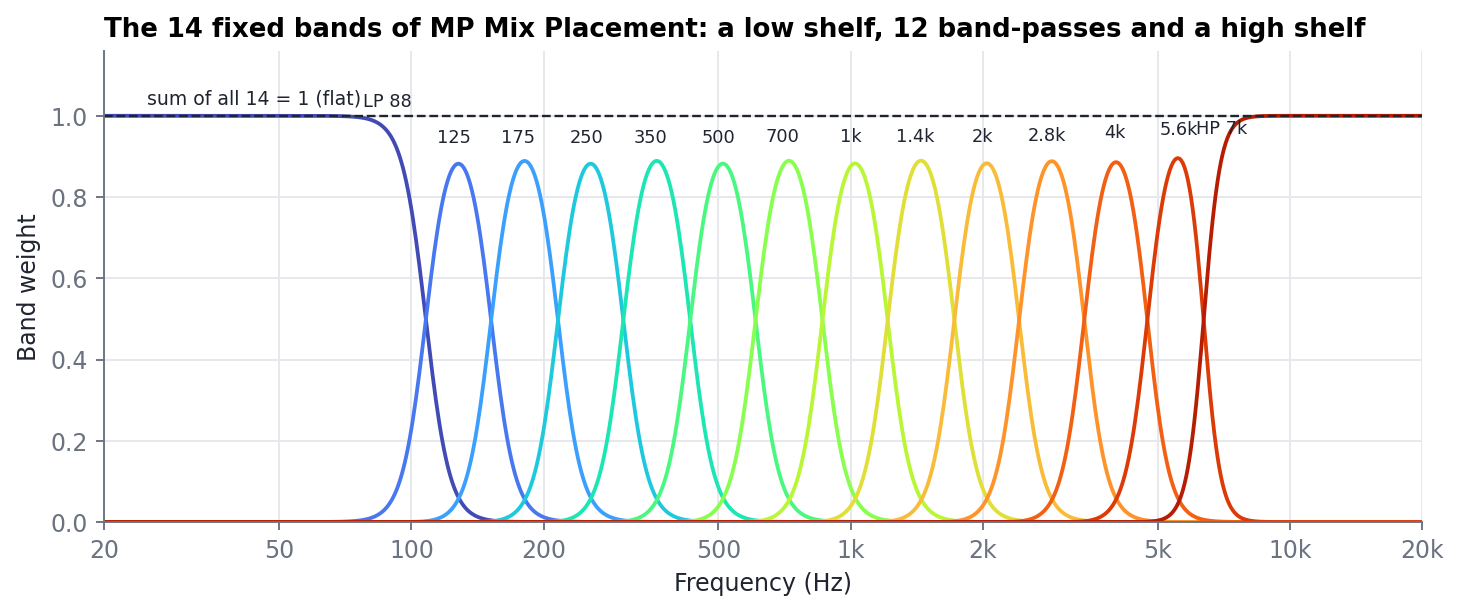
Figure 1. The 14 bands. Each curve is one band's share of the sound at each frequency; together they always add up to exactly 1, so with every band at 0 dB the plugin is perfectly flat.
Around the bands sit input and output gain (+/-24 dB), an input low cut and an output high cut (6-48 dB/octave), Auto Gain that keeps the loudness constant while you shape the sound, a Processing On/Off switch, a library of 231 placement presets, and a display with input and output spectrum, the EQ curve, phase, stereo correlation and loudness and true-peak meters.
Everything happens with zero latency: the plugin reports no delay to the host, so it can be used while tracking and on live inputs, and it never shifts a track against the others.
3. Purpose: a mix placement tool
MP Mix Placement is designed to answer four placement questions for every part of a mix. Each maps directly onto its controls.
| Question | What you do in MP Mix Placement | Typical presets |
|---|---|---|
| Where in frequency? (making space) | Cut the bands where another part needs to be heard; boost the bands that carry this part's identity. | Make Room, Remove Mud, De-Box |
| How near or far? (depth) | Presence (2-4 kHz) and air (above 7 kHz) bring a sound forward; taking them away, and adding a little warmth, pushes it back. The high cut adds distance. | Depth & Distance, Upfront & Clear, Sit Back In The Mix |
| How wide, and where left-right? (stereo) | Pan bands individually: alternate bands left and right to widen a mono sound, or lean the mids and highs to one side while the lows stay centred. | Stereo Placement, Rhythm Left / Right, Wide Stack |
| What character? (colour) | Drive individual bands: grit in the presence region, weight in the lows, without touching the rest of the spectrum. | Character & Saturation, Rock Grit, Vintage Thump |
Table 1. The four placement questions and the MP Mix Placement controls that answer them.
3.1 Making space in frequency
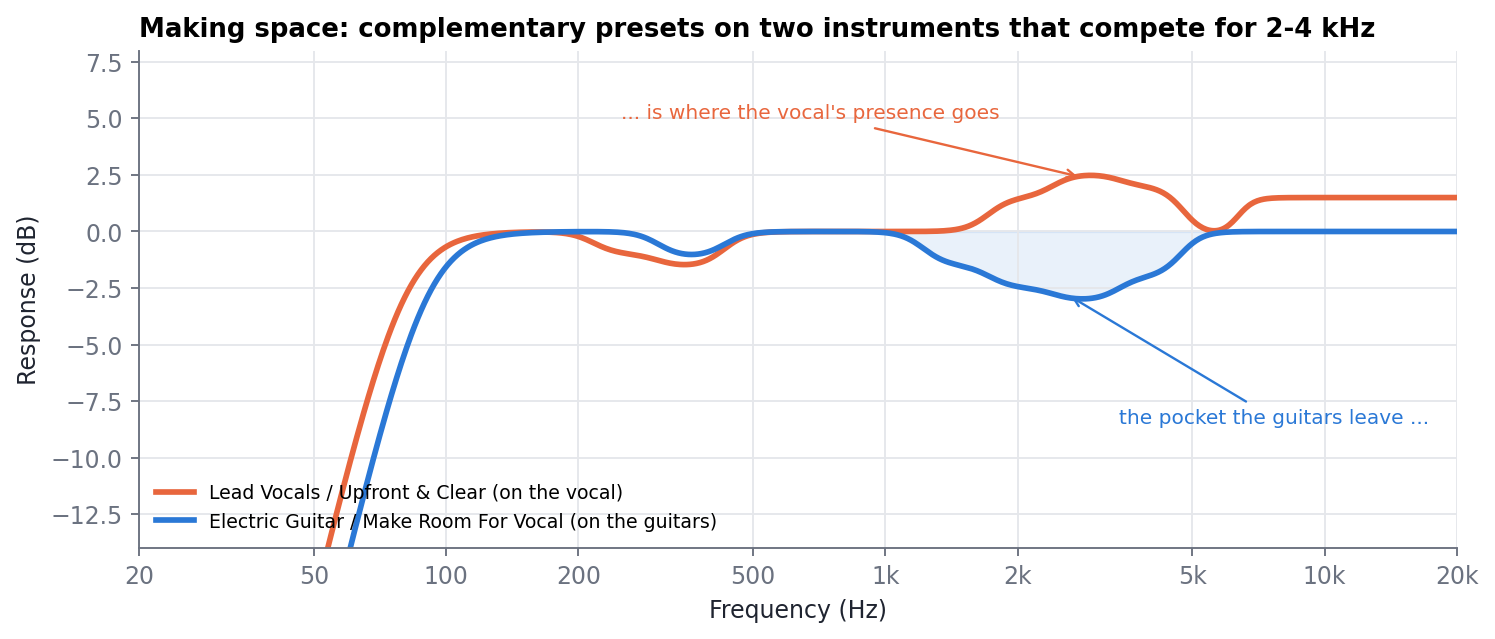
Figure 2. Complementary placement: the guitars give up 1.4-4 kHz (blue), the vocal takes it (orange). Both also have a low cut. Each move is only 2-3 dB, but together they open a pocket of about 5 dB.
3.2 Depth: near and far
Distance is heard mainly through the balance of high frequencies: nearby sources are bright and present, distant ones lose presence and air to the room and the air in between. The Depth & Distance presets apply exactly that, in steps from Very Close to Next Room. Because Auto Gain keeps the loudness the same, the sound moves back without simply getting quieter - which is what real distance sounds like in a mix.
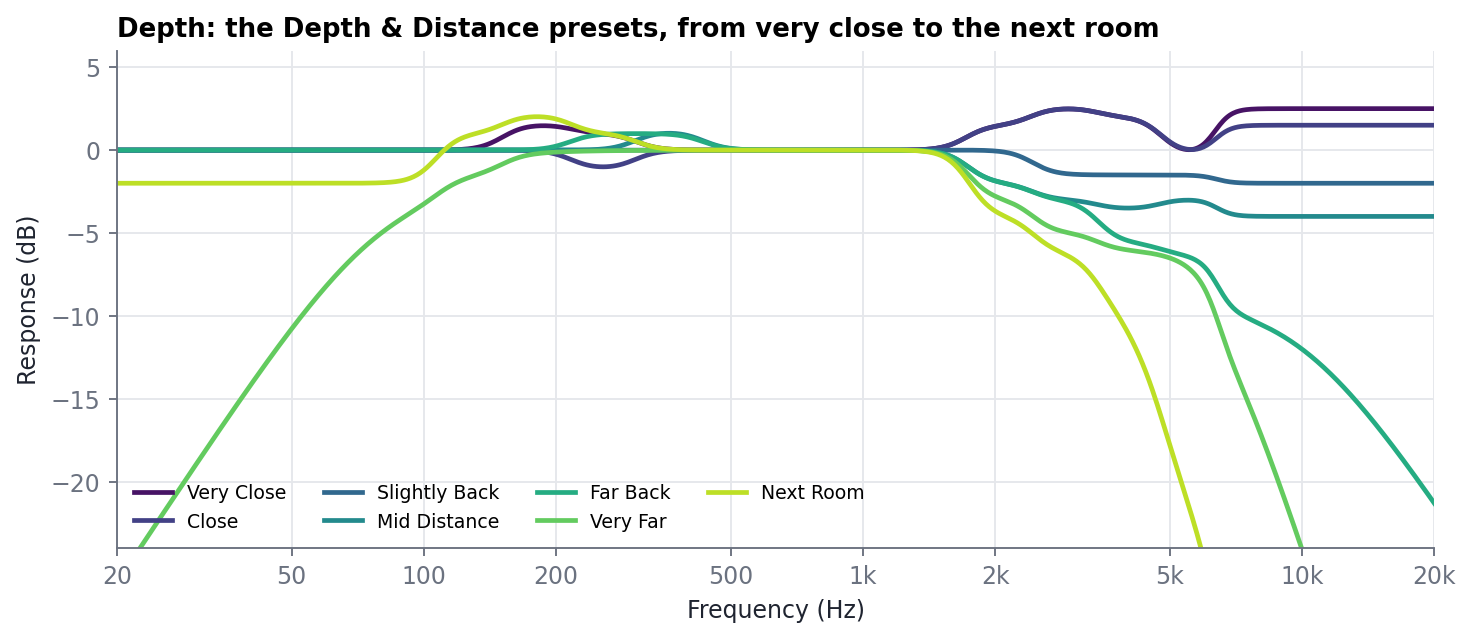
Figure 3. The Depth & Distance presets (band EQ plus their low and high cuts).
3.3 Width and position
Each band has its own pan. This allows placements that a normal panner cannot make:
- Spectral widening: alternate bands go slightly left and right. A mono source becomes wide without delays or modulation, so it stays exactly mono-compatible (the two channels only differ in level per band, never in time).
- Position with a centred low end: the mids and highs lean to one side while the bass stays in the middle - the way two rhythm guitars are often placed.
- Width only where you want it: for example Wide Highs Only spreads the top while the body stays focused.
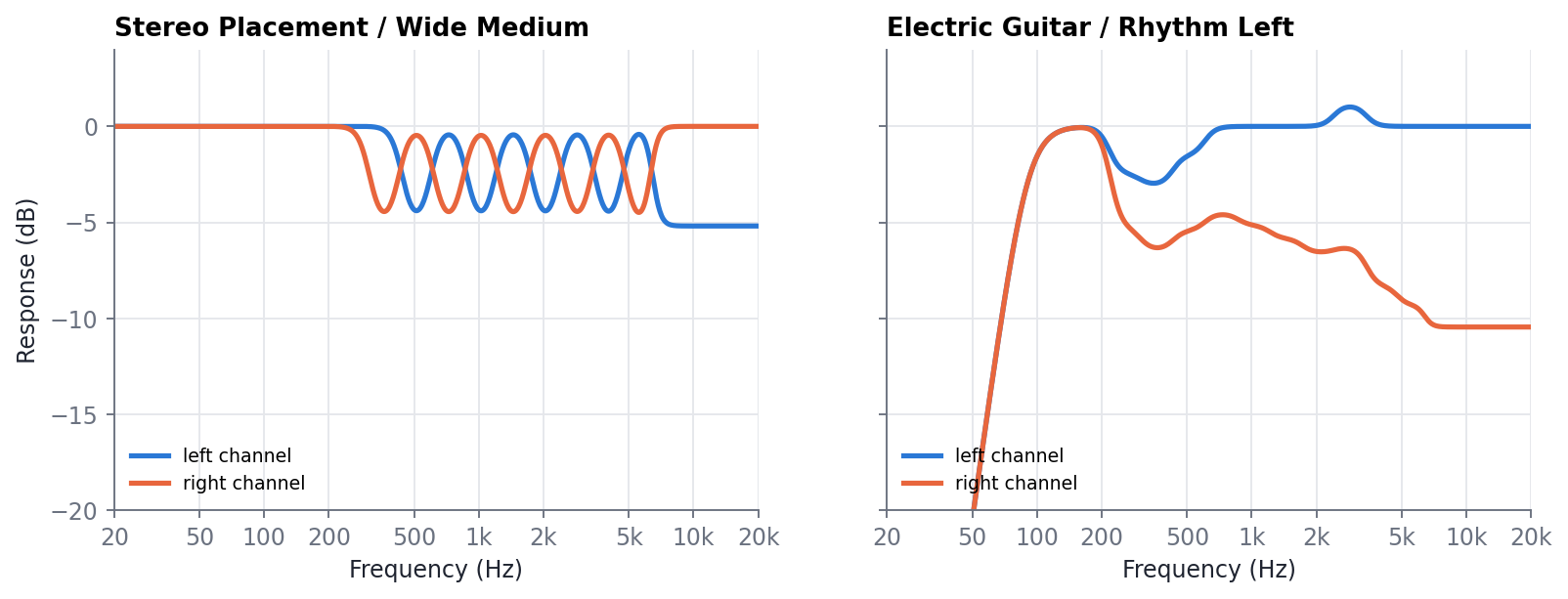
Figure 4. Left and right channel responses of two stereo presets. Left: Wide Medium alternates bands from 350 Hz up. Right: Rhythm Left leans the mids and highs left with the lows in the centre (plus its mud cut and low cut).
Pan in MP Mix Placement is a balance control: moving a band to the right lowers its level in the left channel, and vice versa. It never mixes the left signal into the right, so stereo recordings keep their own image.
3.4 Character
Per-band Drive adds harmonics only to the band you choose: grit on a vocal's presence, weight on a kick's low end, bite on a bass for small speakers. The band's level does not change - only harmonics are added - so you can add character without having to rebalance.
4. The research
The concept sounds simple, but it hides a hard signal-processing problem. MP Mix Placement had to meet all of these at once:
- Fourteen fixed bands with musically chosen band shapes, every band +/-18 dB, mute, solo and pan.
- Real isolation: muting a band must remove it by at least 18 dB at its centre, and moving one band must not disturb the others.
- Exact neutrality: with every control at 0 the output must be identical to the input.
- Zero latency, so it can be used anywhere in a session, including live.
- No sonic side effects: no pre-ringing before transients, and no smearing of the bass in time.
- Predictable gain: moving all bands together must behave like a plain volume change.
These goals pull against each other. Sharp band isolation normally costs latency or time smearing; linear-phase filters avoid smearing but add latency and pre-ringing; minimum-phase tricks applied to the wrong structure break the isolation.
4.1 Thirty-seven prototypes
The engine went through 37 archived prototype versions (v0 to v4.5) before the current v4.6 engine. They covered every major family of techniques: cascaded and complementary IIR crossovers, Linkwitz-Riley trees, numerically fitted filters, linear- and mixed-phase FIR partitions, STFT / WOLA spectral processing, multirate and lifting (wavelet-style) filter banks, warped all-pass trees and phase-coherent full banks. Each was measured against the goals above, and most were rejected for a measured reason.
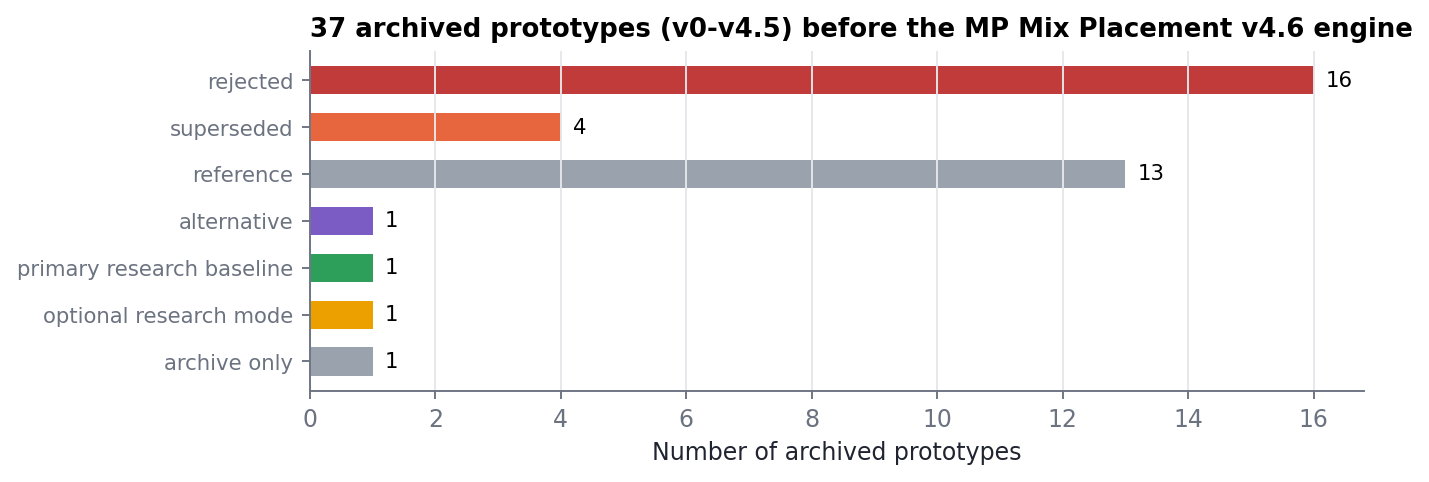
Figure 5. Disposition of the archived prototypes (from the research archive report).
The results showed a consistent pattern: every architecture that isolated the bands well held the bass back in time - either as a fixed latency for the whole signal (with pre-ringing), or as a large group delay of the low frequencies.
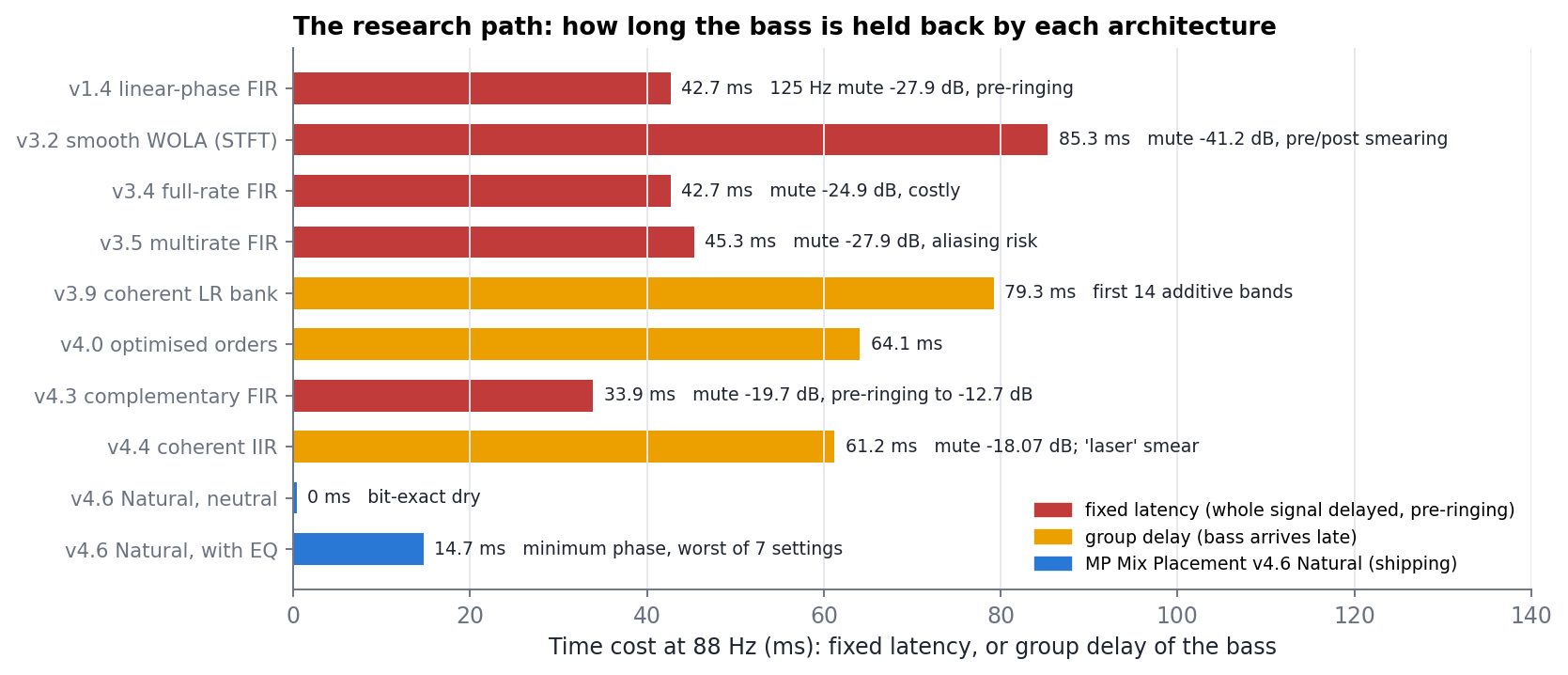
Figure 6. Time cost at 88 Hz across the main architectures. Red: fixed latency; amber: group delay of the bass; blue: the shipping MP Mix Placement v4.6 Natural engine.
4.2 The phase-coherent bank and the 'laser' problem
The best-performing research design (v4.4) was a causal, phase-coherent bank of Linkwitz-Riley crossovers: fourteen bands that add back together exactly, isolation of -18.07 dB, and no latency. On measurements it passed. In the listening review it did not: every file, even at neutral, had a 'laser-like' smear. The bank's common phase response is a descending chirp; the bass of a kick or a bass note arrived about 55 ms after its attack.
A dedicated study measured this on 177 real low-frequency transients from 14 recordings (kicks, drum recordings, bass stems, piano and full mixes), comparing the coherent bank, a linear-phase design and ideal references with the same magnitude. It confirmed the smear (bass shifted 45-57 ms, median) and showed that within that architecture it could not be reduced without losing the isolation.
4.3 The breakthrough: the Natural core
The solution was to separate what the bank does from how it is realised. The MP Mix Placement keeps the bank's exact magnitude curves - the same 14 band shapes, the same gain law, mute, solo and pan - but realises the combined curve as a single minimum-phase filter. Of all filters with a given magnitude, the minimum-phase one has the least possible delay of energy: no pre-ringing at all, and the smallest possible smearing. That is also how a good analog equaliser behaves.
- Design: for every change of the controls the exact target curve is converted to a minimum-phase impulse response with the real-cepstrum method (Oppenheim & Schafer), 8192 taps at 44.1/48 kHz, scaled with the sample rate. The realised curve matches the target within 0.000005 dB.
- Zero-latency convolution: a uniformly partitioned FFT convolution with a direct time-domain head (Gardner's scheme) gives 0 samples of latency at a fraction of the cost of direct convolution.
- Glitch-free changes: new filters are designed on a background thread and crossfaded in; because the convolution keeps the full input history, the new filter is correct from its first sample, so moves on the controller never click.
- Bit-exact neutral: when the curve is flat the engine is an exact pure gain: the output is identical to the input, bit for bit.
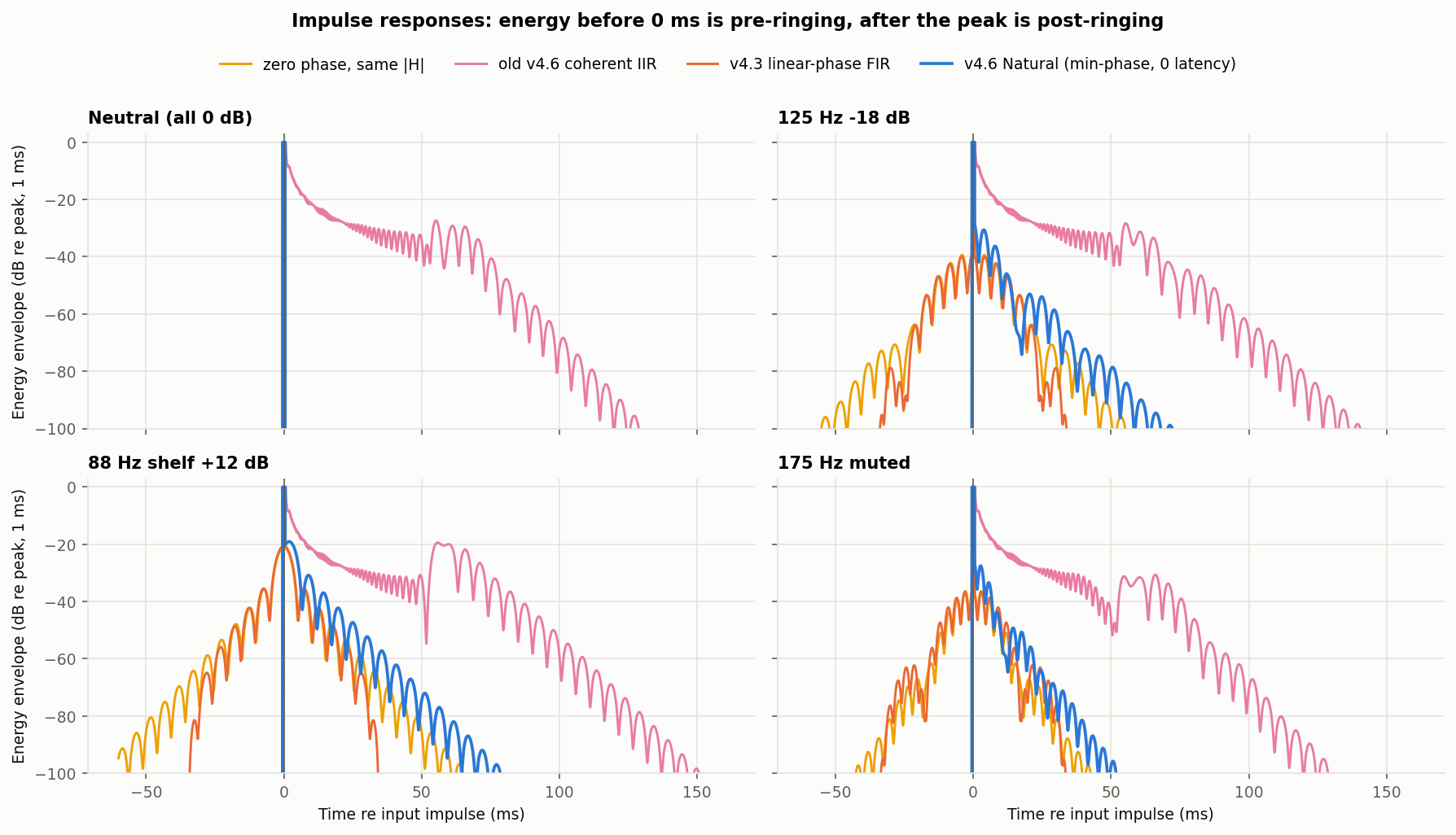
Figure 7. Impulse responses (48 kHz). Anything left of 0 ms is pre-ringing. The old coherent core (pink) smears energy over 100+ ms even at neutral; linear phase (orange) pre-rings; the Natural core (blue) is a single impulse at neutral and has the shortest possible decay with EQ.
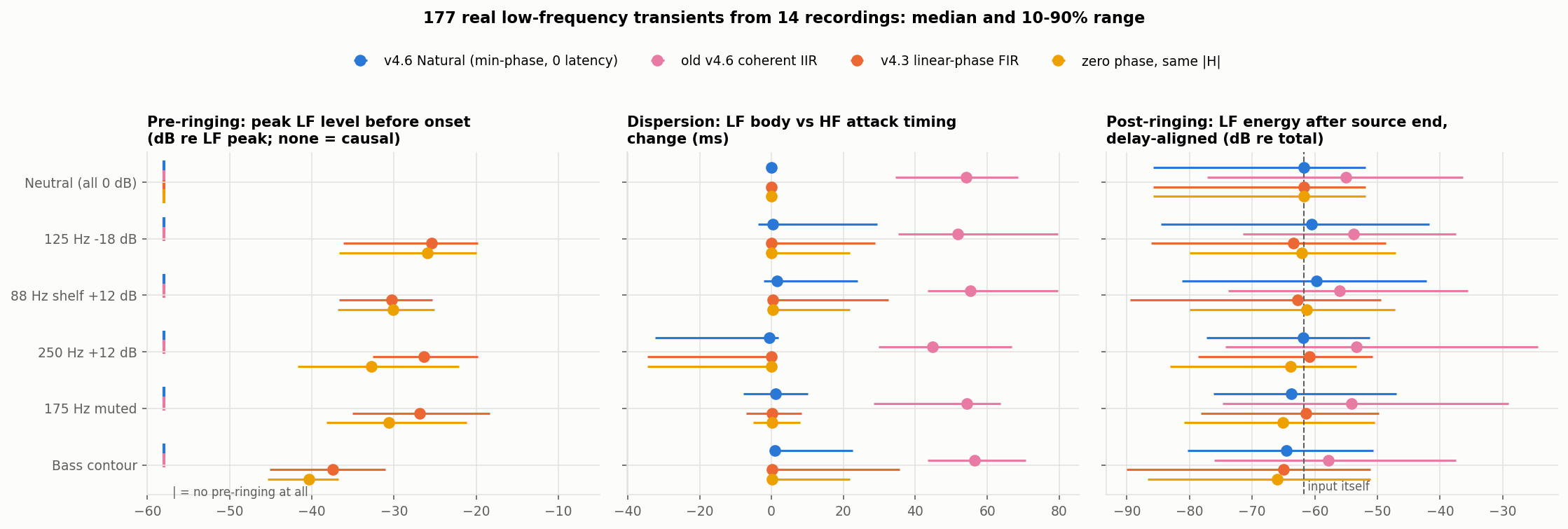
Figure 8. 177 real transients: pre-ringing, bass-versus-attack timing and post-ringing for each engine (median and 10-90 % range).
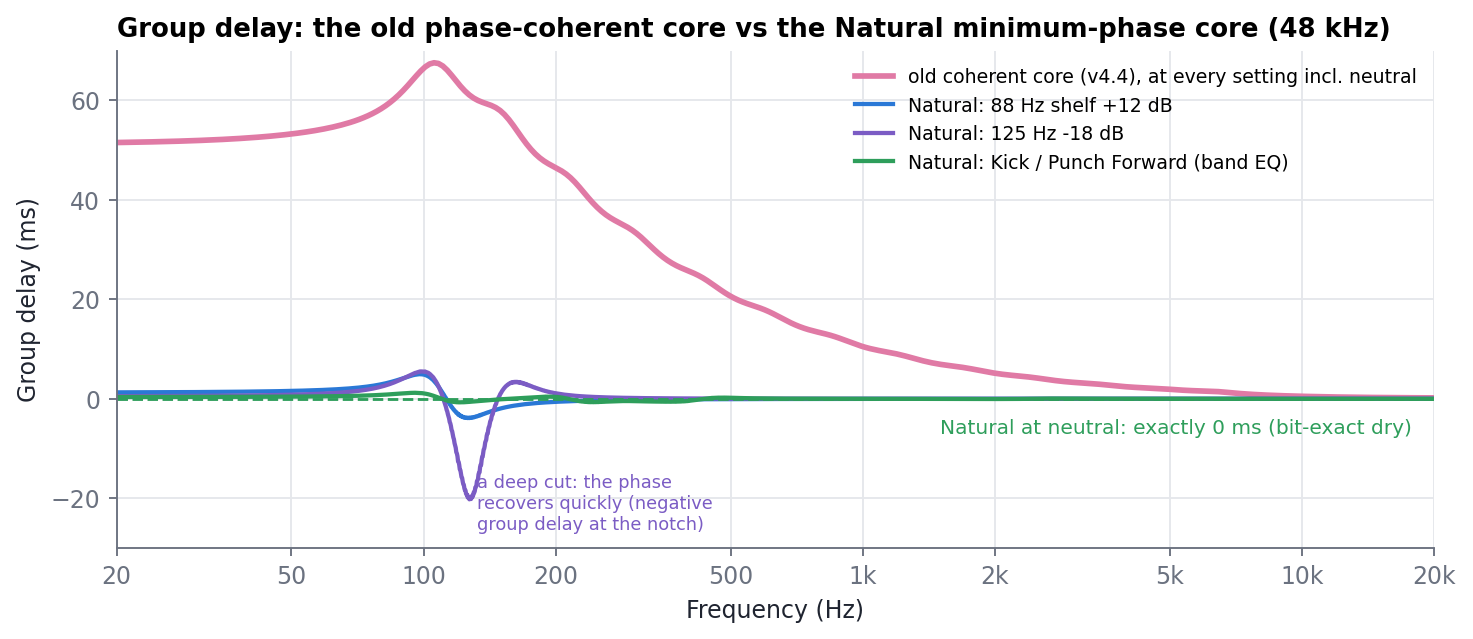
Figure 9. Group delay of the bass. The old coherent core delays 88 Hz by about 61 ms at every setting, including neutral. The Natural core is exactly 0 at neutral and only a few milliseconds around the bands you move.
4.4 A gain law that behaves
A filter bank with overlapping bands needs a rule that turns the 14 knob settings into band gains. The research version calibrated each band to hit its own setting at its centre, but those corrections stacked: setting all bands to -18 dB produced -20.7 to -59.6 dB instead of -18 dB, and all +18 dB produced up to +19 dB.
MP Mix Placement uses a new shape-preserving gain law, borrowed from numerical methods for fluid dynamics (minmod / TVD slope limiters). A band is sharpened only where the knob settings have a peak or a valley, and only relative to its nearer neighbour. The result:
- Uniform settings are exact: all bands at -18 dB give -18.000 dB everywhere (deviation below 0.00000000000001 dB).
- A single moved band still reaches its setting exactly at its centre.
- The shelves keep exact plateaus.
- Over 1500 random settings per sample rate, the worst unwanted dip is about 1 dB (the research version: up to 19.8 dB).
- It is continuous and safe under automation, with no switching.
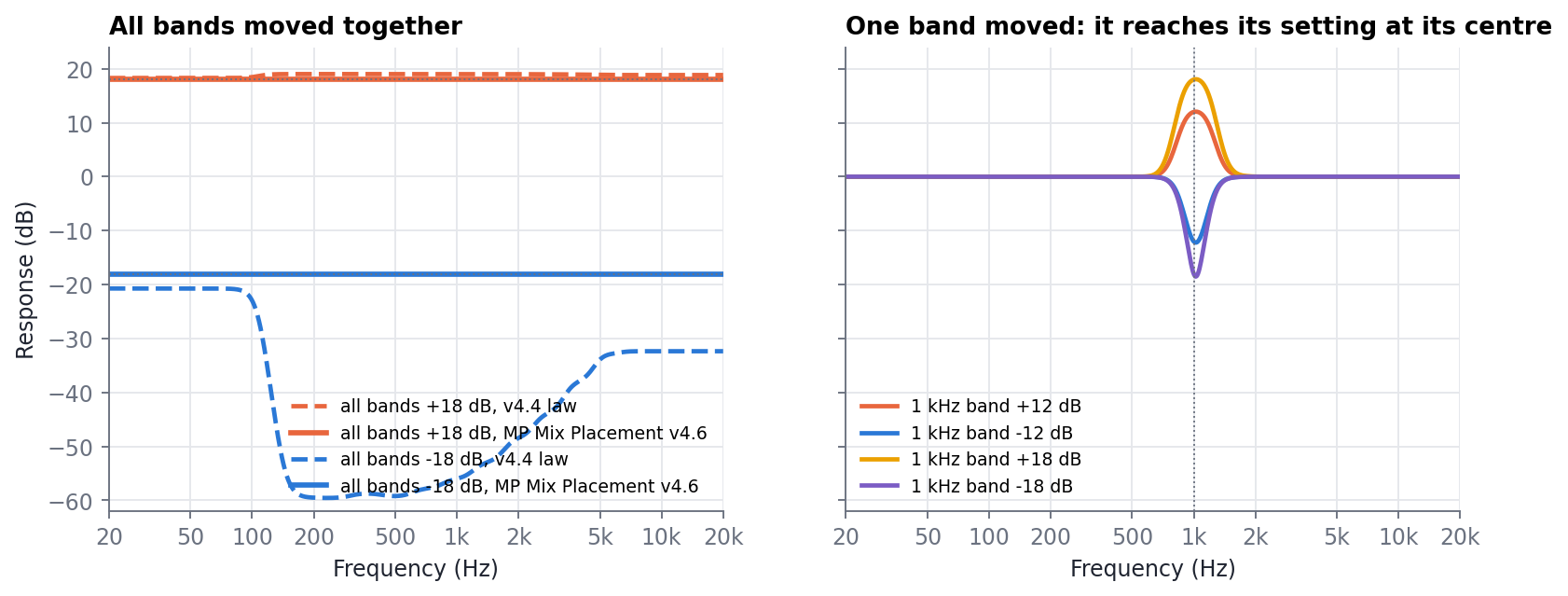
Figure 10. Left: all bands moved together - the research gain law (dashed) versus the MP Mix Placement law (solid). Right: one band moved by +/-12 and +/-18 dB; it reaches its setting at 1 kHz and returns to 0 dB within about an octave.
4.5 Saturation that only adds harmonics
Per-band saturation normally needs the band as a separate signal, and saturating it changes its level. MP Mix Placement derives each driven band from its crossover chain, shapes it with a soft, mildly asymmetric curve (so both 2nd and 3rd harmonics appear), and then removes the part of the result that is just a copy of the band, with a running least-squares projection. Only the newly created harmonics are mixed in, so the band keeps its level at any drive. Anti-aliasing uses first-order antiderivative anti-aliasing on every band plus 2x oversampling for the upper bands.
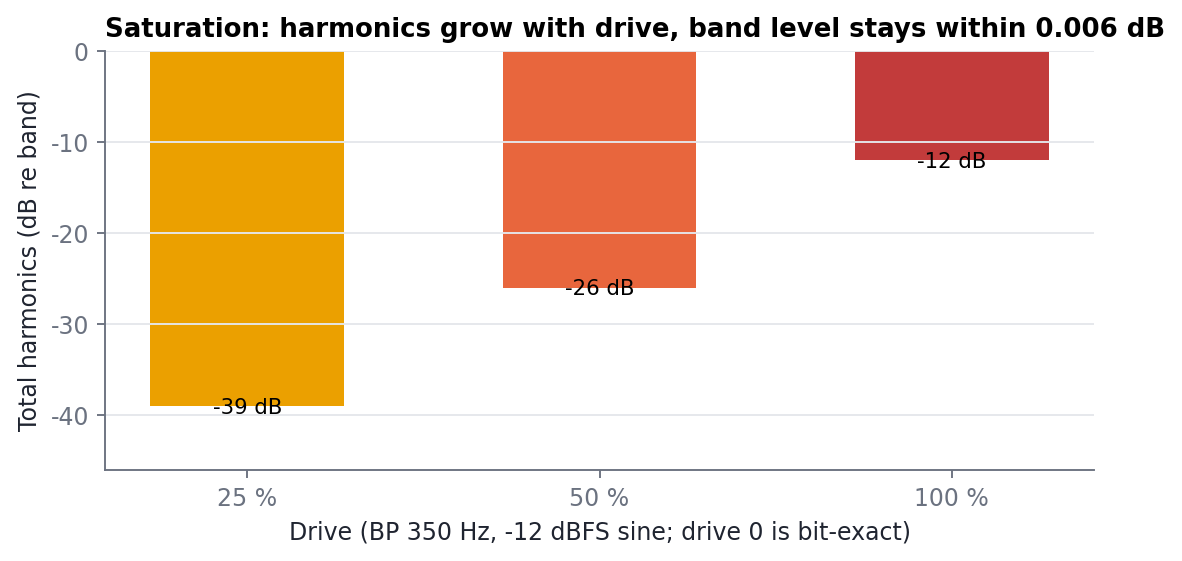
Figure 11. Harmonics added to the 350 Hz band at -12 dBFS versus drive (measured). The band's own level changes by at most 0.006 dB.
5. What was achieved
All figures below were measured by the DSP and plugin test suites (Release build, Windows, MSVC). They describe the shipping engine.
| Property | Measured result |
|---|---|
| Neutral (all controls at 0) | Output identical to input, bit for bit |
| Latency | 0 samples |
| Pre-ringing | None, on every setting and on all 177 real transients |
| Bass timing vs attack (177 transients) | 0-1.5 ms median shift (old coherent core: 45-57 ms) |
| Low-frequency tail after a transient | Equal to the input itself (-61.7 dB analysis floor) |
| Realised curve vs target | Within 0.0000047 dB, at 44.1 / 48 / 96 / 192 kHz |
| All bands at -18 dB / +18 dB | -18.000 / +18.000 dB (research version: -20.7...-58.6 / up to +19.0 dB) |
| Single band at its centre | Exact (error 1e-14 dB) |
| Worst unwanted dip, 1500 random settings | 0.83-1.07 dB (research version: 19.8 dB) |
| Centre mute isolation | -18.07 dB or deeper at 44.1-96 kHz; -18.02 dB at 192 kHz |
| Gain / mute / solo jumps on a sine | No clicks (peak step 1.0004 / 0.999 / 1.021 of the sine bound) |
| Auto Gain (curve mode), pink noise, 5 curves | Loudness held within 0.21 dB |
| True-peak meter accuracy | Within 0.06 dB (20 Hz-20 kHz) |
| Saturation: band level change | At most 0.006 dB at any drive; drive 0 bit-exact |
| Saturation aliasing (worst case, 5.6 kHz band, 100 %) | -60 dB |
| Sample rates | 32-384 kHz (tested 44.1 to 192 kHz); mono and stereo |
| Plugin validation | pluginval strictness 10: pass; 153 plugin checks and 11 DSP test suites pass |
Table 2. Key measurements of MP Mix Placement v4.6.
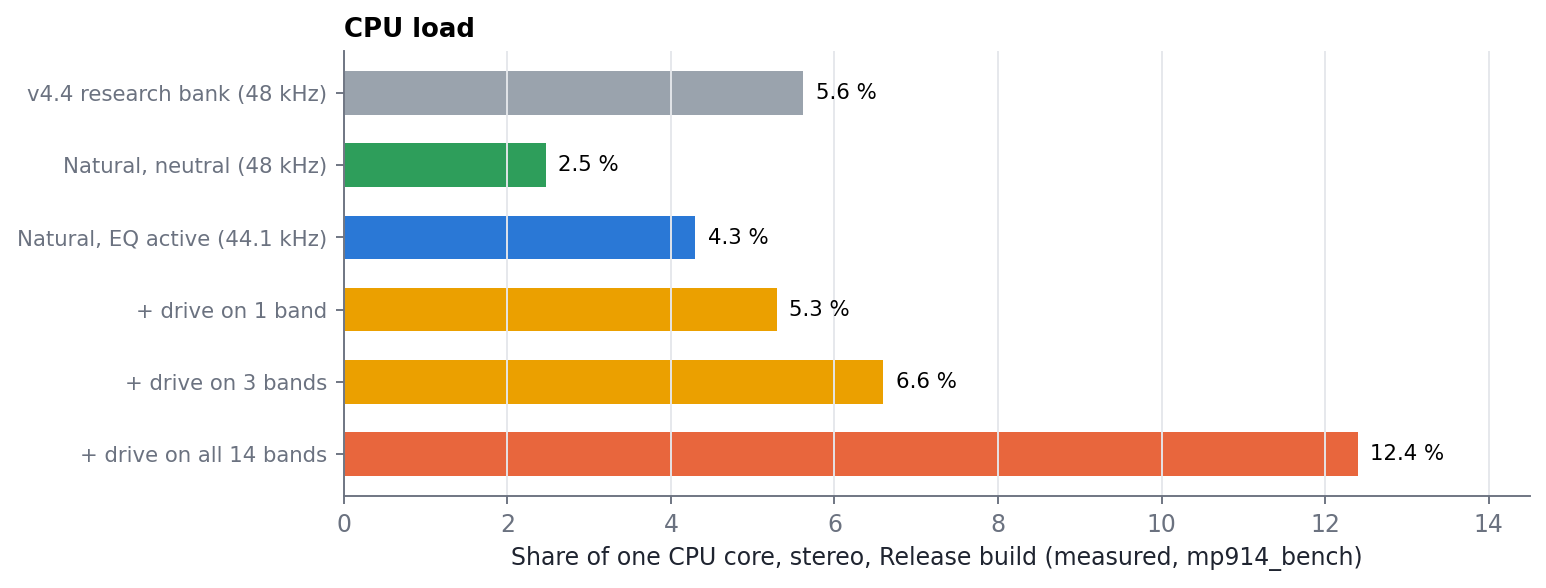
Figure 12. CPU load (share of one core, stereo, Release build). Saturation costs nothing until a band's Drive is above 0.
| CPU: Use a Release build in your DAW. A Debug build of the engine costs about 19 times more CPU (88 % of a core instead of 4.7 %). |
|---|
6. What makes it unique
Many plugins offer equalisation, stereo imaging or saturation. MP Mix Placement is distinctive in how it combines them and in how each part is engineered:
- A fixed filter bank that is fully modern underneath. The fast, musical 914 workflow - fixed bands, one control each - realised as a minimum-phase filter with zero latency, no pre-ringing and a bit-exact neutral position. Fixed-band designs usually inherit the phase smear of their crossovers; MP Mix Placement keeps the bank's shapes but not its smear.
- Placement in one device. Frequency space, depth, per-band stereo position and per-band character are all controls of the same 14 bands, so one gesture can move a part forward and to the left at the same time. Spectral widening by per-band balance is mono-compatible by construction: no delays, no decorrelation.
- A gain law with exact collective behaviour. The shape-preserving law applies slope-limiter ideas from numerical fluid dynamics to equaliser gain mapping. To our knowledge this is a new approach for graphic and filter-bank equalisers; it fixes the well-known problem that overlapping bands either miss their settings or misbehave when moved together.
- Saturation that does not change the balance. The least-squares projection removes the band's own copy from the saturated signal, so Drive only adds harmonics. Character can be added after the mix balance is set.
- Loudness-neutral by design. Auto Gain uses a closed-form model of the curve's loudness change, follows every move instantly, does not depend on the programme, and is exactly 1 at neutral. Presets therefore move material rather than making it louder.
- Built for hands, not a mouse. Every band control maps to the MP Controller's encoders and buttons in band order; the window is a touch-friendly display of spectrum, curves, phase and meters. A preset encoder steps through the library and loads only when you stop, and the host flashes the encoder of any control you hover over or touch.
- A placement library. 231 factory presets in 22 categories, written as placement moves for each instrument (forward / back, wide / narrow, left / right, making room, character) rather than as tone fixes.
- Measured, not assumed. Every claim in this manual comes from an automated test or a documented study; the research archive records all 37 earlier prototypes, including the ones that failed and why.
Honest scope. The engine's perceptual quality has been checked in a listening review but not yet in formal blind listening tests; AU/macOS builds and a full matrix of DAW hosts have not been tested yet.
Part II - Operating MP Mix Placement
7. Installation and licence
7.1 Installing
- Windows: copy "MP Mix Placement.vst3" to C:\Program Files\Common Files\VST3 and rescan plugins in your host (or in MP Host).
- macOS: the AU component goes to ~/Library/Audio/Plug-Ins/Components, the VST3 to ~/Library/Audio/Plug-Ins/VST3.
- Formats: VST3 on Windows; AU and VST3 on macOS. It is a plugin only (there is no standalone application): load it in MP Host or in your DAW. Mono and stereo tracks are supported; the plugin adds no latency.
7.2 Licence
MP Mix Placement uses the same licence as MP Host. On first start it looks in the MP Host folder (Windows: %APPDATA%\MP\Host; macOS: ~/Library/Application Support/MP/Host):
- hardware.id identifies this computer. The plugin creates it if it is missing.
- mph.license the licence file you download from the MP User Portal. If MP Host is already licensed on this computer, MP Mix Placement is licensed too.
Without a valid licence the audio passes through unprocessed and a message covers the window:
- Tap OPEN LICENSE FOLDER and upload hardware.id to the MP User Portal (userportal.mpmidi.com).
- Download mph.license from the portal and put it in the same folder.
- Tap CHECK AGAIN. The message disappears and processing starts. HOW TO LICENSE opens the step-by-step page in the MP knowledge base.
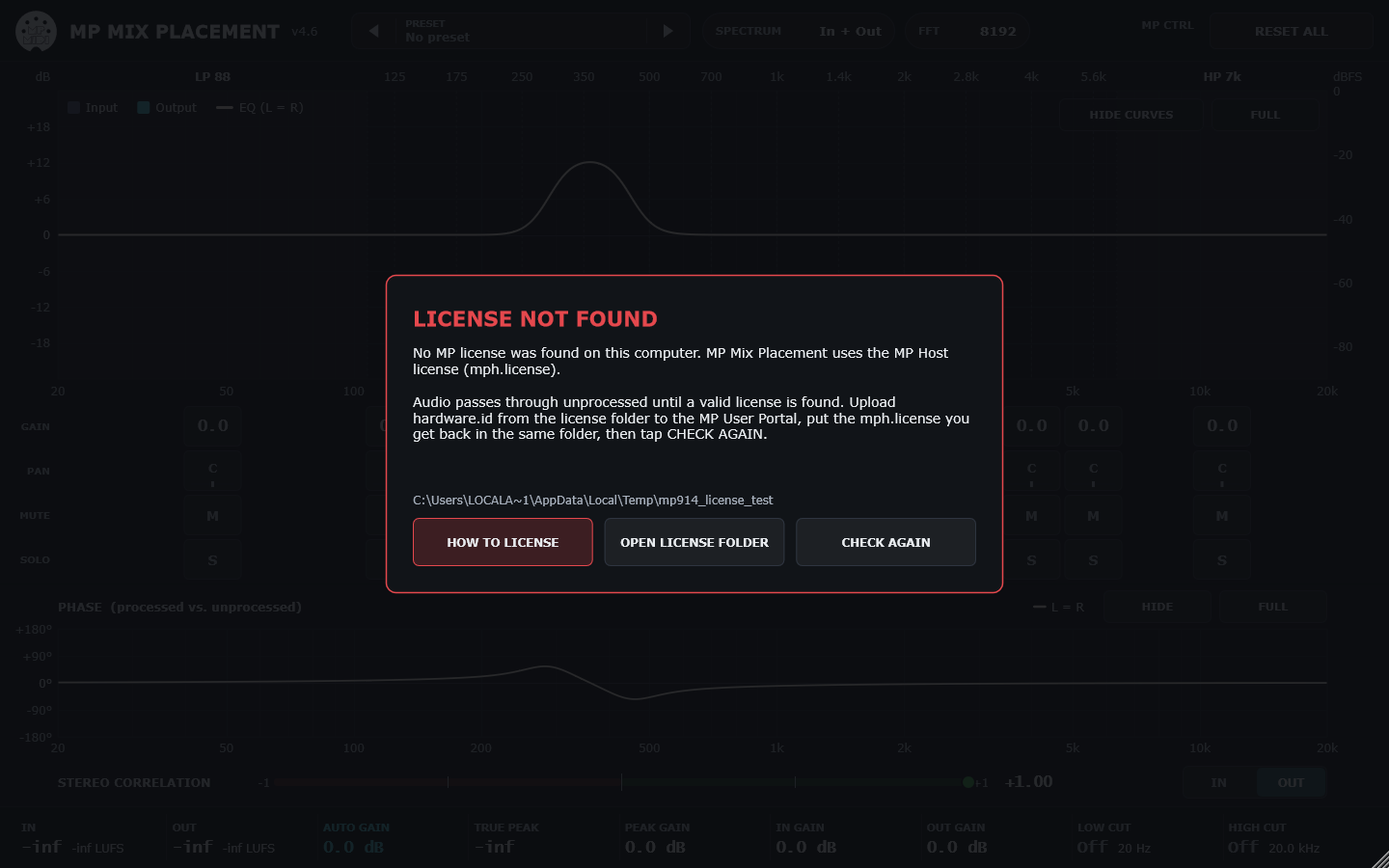
Figure 13. The licence message.
8. The screen at a glance
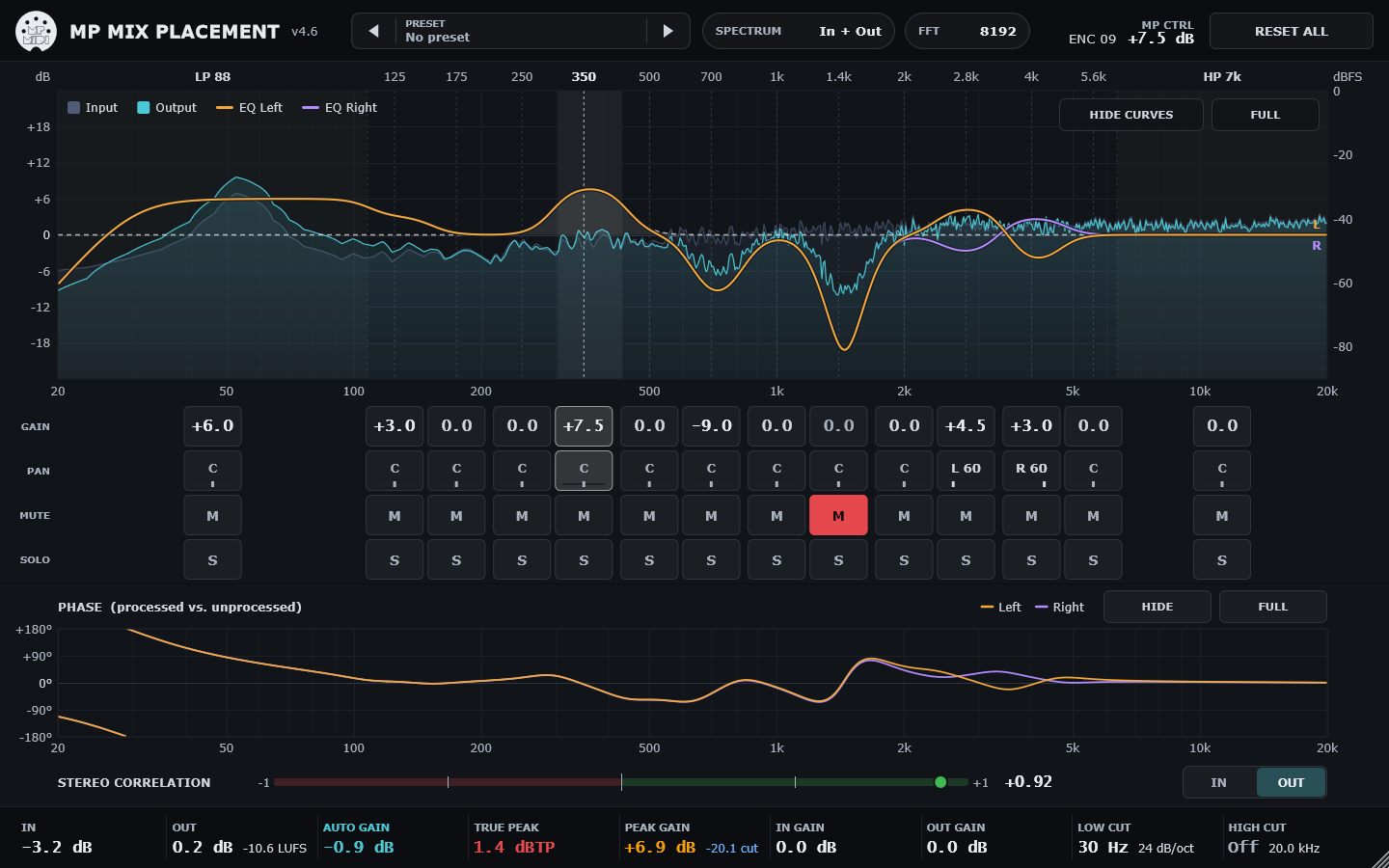
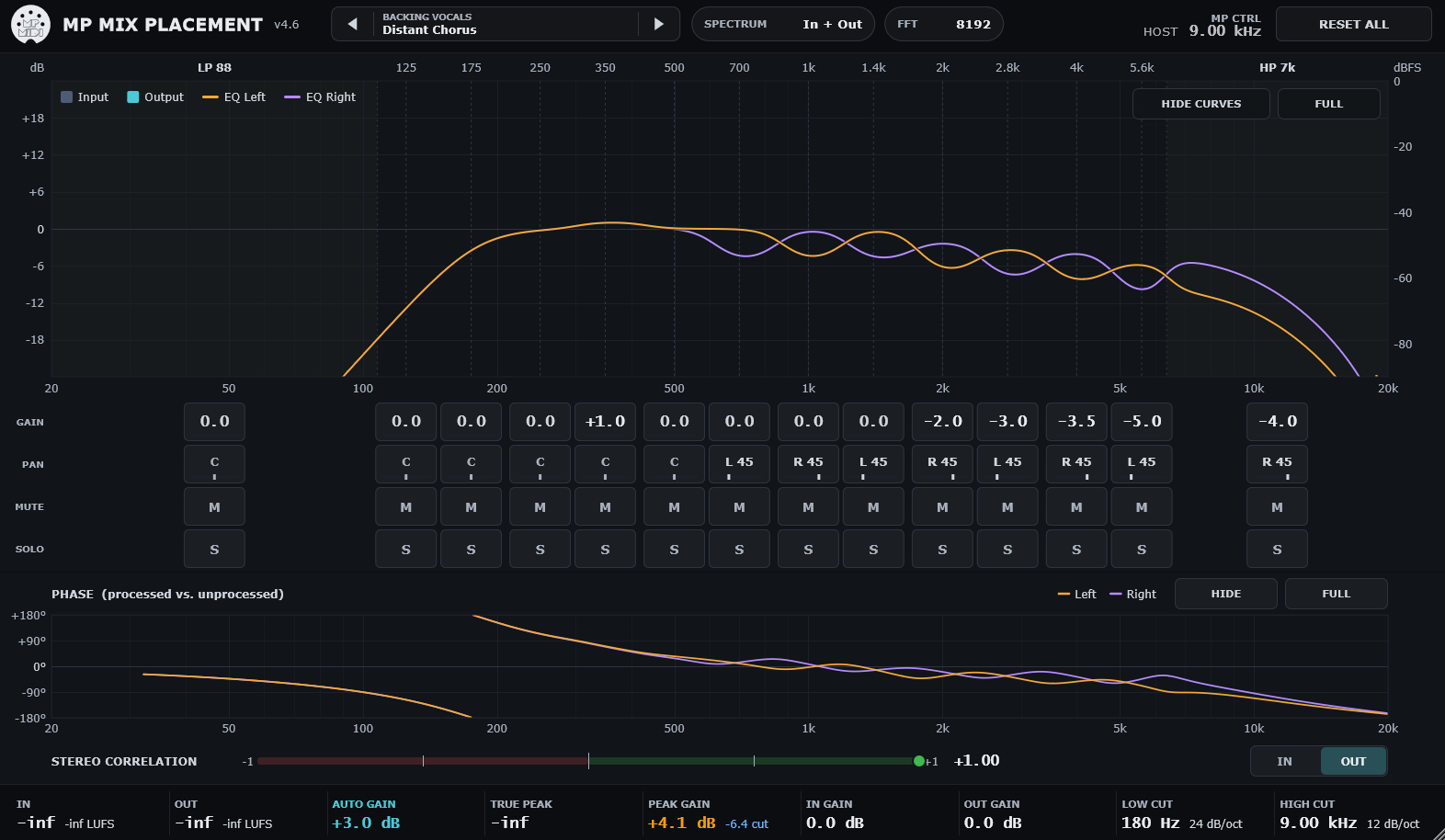
Figure 14. The main window: header (top), spectrum with the band strip, phase and correlation panel, status bar (bottom).
| Area | What it shows and does |
|---|---|
| Header | MP MIDI logo (tap: opens this plugin's documentation), title and version, the PRESET button with arrows, SPECTRUM mode, FFT size, the MP CTRL readout of the last controller move, RESET ALL. Badges such as PROCESSING OFF and MONO appear here. |
| Spectrum | Input spectrum (subdued) and output spectrum (bright), the EQ curve (one curve, or separate L and R curves when pans differ), the band centres, and the HIDE CURVES and FULL buttons. |
| Band strip | Four touch boxes under each band: GAIN, PAN, MUTE, SOLO. |
| Phase panel | Phase of the processed versus the unprocessed signal, and the stereo correlation meter with its IN / OUT switch; HIDE and FULL buttons. |
| Status bar | Input and output level with momentary loudness, Auto Gain, true peak, peak gain (headroom), input and output gain, low cut and high cut. |
Table 3. Screen areas.
9. The bands
9.1 On the MP Controller
The plugin is designed to be played from the MP Controller. Its parameters are ordered so that the controller's encoders and buttons follow the bands from low to high:
| Band | Encoders: Gain / Pan | Buttons: Solo / Mute |
|---|---|---|
| LP 88 Hz | 1 / 2 | 1 / 2 |
| BP 125 Hz | 3 / 4 | 3 / 4 |
| BP 175 Hz | 5 / 6 | 5 / 6 |
| BP 250 Hz | 7 / 8 | 7 / 8 |
| BP 350 Hz | 9 / 10 | 9 / 10 |
| BP 500 Hz | 11 / 12 | 11 / 12 |
| BP 700 Hz | 13 / 14 | 13 / 14 |
| BP 1 kHz | 15 / 16 | 15 / 16 |
| BP 1.4 kHz | 17 / 18 | 17 / 18 |
| BP 2 kHz | 19 / 20 | 19 / 20 |
| BP 2.8 kHz | 21 / 22 | 21 / 22 |
| BP 4 kHz | 23 / 24 | 23 / 24 |
| BP 5.6 kHz | 25 / 26 | 25 / 26 |
| HP 7 kHz | 27 / 28 | 27 / 28 |
Table 4. Band controls on the MP Controller.
| Control | Function |
|---|---|
| Encoder 29 / 30 | Input gain / Output gain (+/-24 dB) |
| Encoder 31 | Preset selector: one step per preset; loads when you stop turning (see 13.4) |
| Button 29 | Auto Gain on / off |
| Button 30 | Processing On / Off (also the host's bypass) |
| Button 31 | Spectrum display mode: In + Out / Out / In / Curves |
Table 5. Global controls on the MP Controller.
Each band's Gain and Pan form one parameter group in the host, and each band's Solo and Mute another, so MP Host shows them in the same colour per band. When you move a control, the header's MP CTRL readout names it (for example ENC 09 BP 350 Hz Gain +7.5 dB) and the band is highlighted in the spectrum for 1.5 seconds.
9.2 In the window (mouse or touch)
| Box | Tap | Drag | Double tap | Hover / touch |
|---|---|---|---|---|
| GAIN | selects the band (highlight) | up / down: about 0.1 dB per pixel, 0.1 dB steps | back to 0 dB | the host flashes the linked encoder |
| PAN | selects the band | right / left (up / down also works): full L-R in 240 px | back to centre | the host flashes the linked encoder |
| MUTE | mutes / unmutes the band (red) | - | - | - |
| SOLO | solos / unsolos the band (yellow); several bands can be soloed | - | - | - |
Table 6. Touch boxes in the band strip.
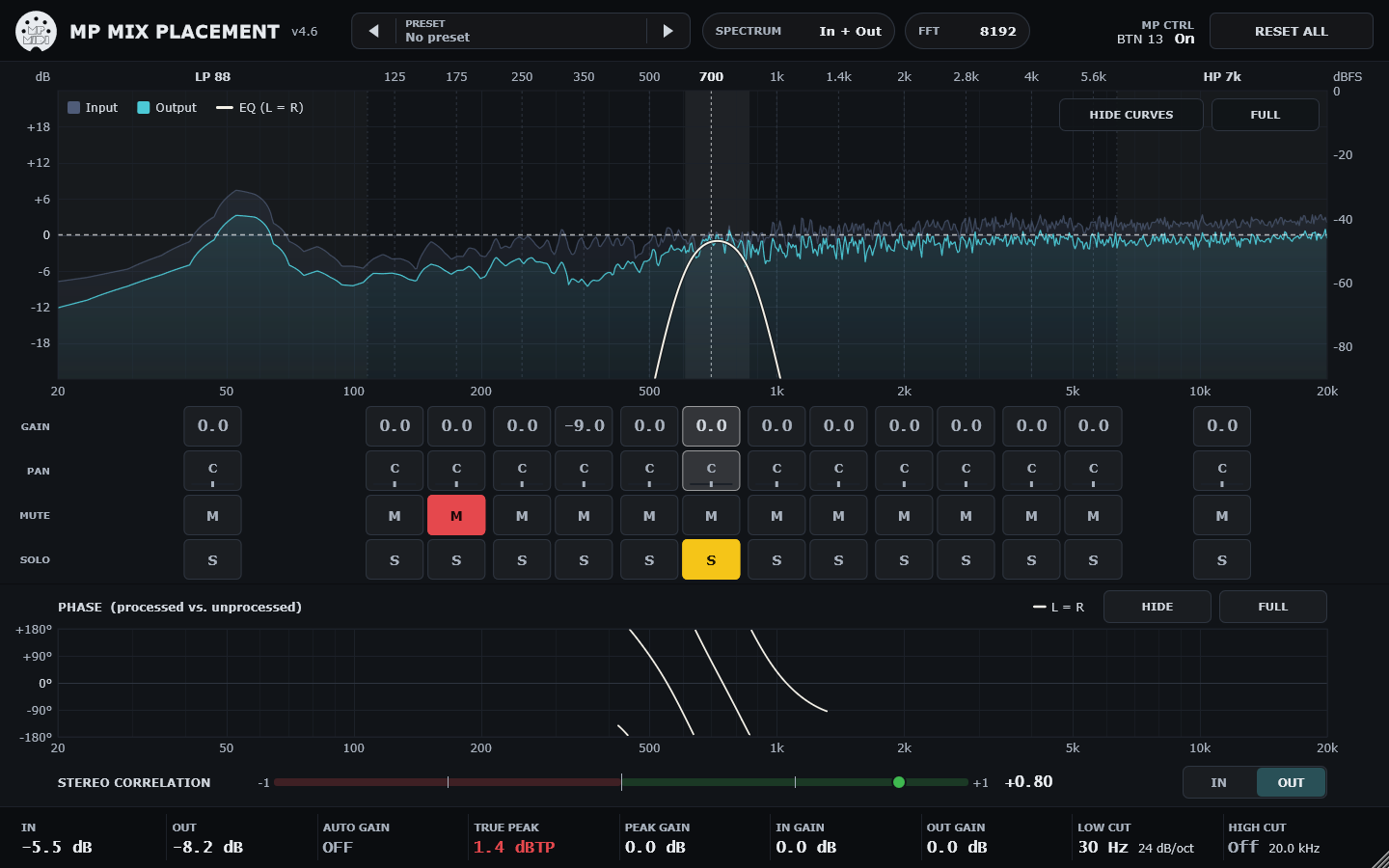
Figure 15. Band strip with muted and soloed bands.
9.3 What the band controls do
- Gain +/-18 dB. A single band reaches its setting exactly at its centre; neighbouring bands blend smoothly. Setting all bands to the same value is exactly a volume change.
- Pan balance from L100 to R100 per band. Centre leaves both channels untouched; moving right lowers that band in the left channel. On a mono track pan has no effect.
- Mute removes the band. Mute overrides solo on the same band.
- Solo plays only the soloed bands - an audition of their shapes. Auto Gain keeps its un-soloed value while you solo, so soloing does not jump the level.
- Drive (host parameter) 0-100 % per band; adds harmonics to that band only. Its level stays the same. At 0 the band is untouched and costs no CPU. The Drive parameters are at the end of the host's parameter list (LP 88 Hz Drive ... HP 7 kHz Drive).
10. Global controls
| Control | Range | What it does |
|---|---|---|
| Input Gain | +/-24 dB | Level into the bank (and into the saturation). |
| Output Gain | +/-24 dB | Level after the bank. |
| Auto Gain | On / Off (default On) | Keeps the loudness constant while you boost and cut: the loudness change of the current curve is calculated for typical programme and compensated after the EQ, gliding over about 50 ms. Exactly 1 when the curve is flat. |
| Processing On / Off | On / Off | Off passes the audio through untouched (a 20 ms crossfade; afterwards the output equals the input exactly). Linked to the host's bypass. |
| Input Low Cut | Off, 6-48 dB/oct; 10-1000 Hz | Butterworth high-pass before the bank. Default Off. Cutoff changes glide smoothly. |
| Output High Cut | Off, 6-48 dB/oct; 1-22 kHz | Butterworth low-pass after the bank. Default Off. |
| Smoothing | 5-100 ms | Crossfade time when the filter changes. 5 ms suits most work; longer values soften big jumps. |
Table 7. Global controls. Low cut, high cut, smoothing and drive are host parameters (automation lanes, MP Host mapping).
RESET ALL (header): tap, then tap again within 3 seconds. Every control returns to its default; the display settings are kept.
11. The spectrum
- SPECTRUM (header) tap to cycle In + Out / Out / In / Curves (also button 31).
- FFT (header) tap to cycle the analysis size 4096 / 8192 / 16384. Larger sizes resolve the bass better; smaller ones react faster. Display only - it does not change the sound.
- Scale the spectrum is drawn in dBFS with a 4.5 dB/octave tilt around 1 kHz, so typical music looks roughly level; the EQ scale (+/-18 dB) is on the left.
- HIDE CURVES / SHOW CURVES hides the EQ curves to see only the spectra.
- FULL cycles FULL (spectrum and band strip fill the window) -> FULL NO BUTTONS (the graph alone) -> EXIT FULL.
- Band highlight the last band moved is highlighted with its own shape; tapping a band pins the highlight, tapping it again releases it.
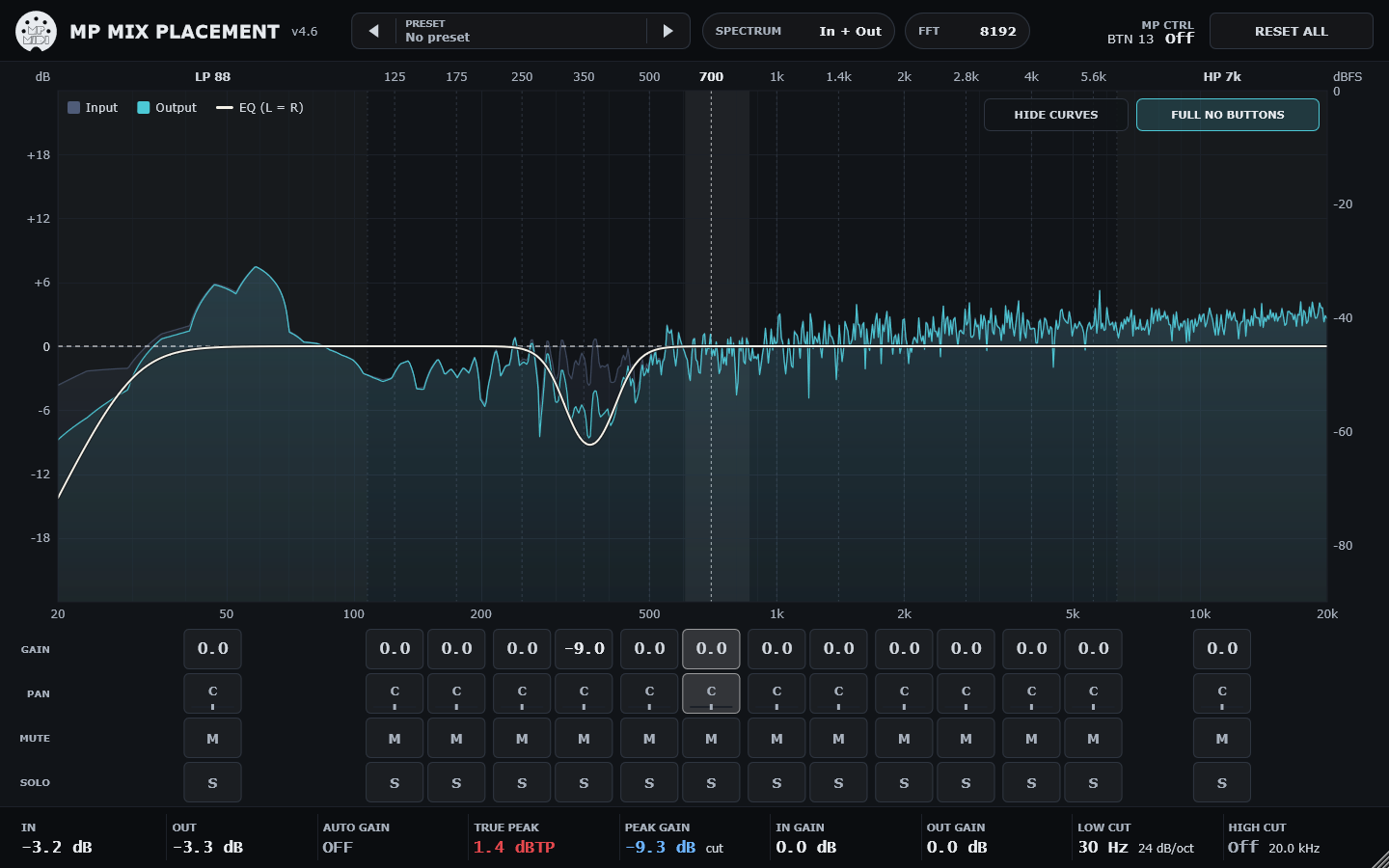
Figure 16. Spectrum in FULL view.
12. Phase and stereo correlation
The phase graph shows, for every frequency, how far the output is shifted against the input (from -180 to +180 degrees). A flat line at 0 means no change: at neutral the line is flat. Boosts and cuts bend it around the band you move - the same small shifts an analog equaliser makes. The curve is calculated from your settings (it does not depend on the music) and is not drawn where a band is muted or the signal is cut.
- HIDE / SHOW collapses the panel to its title and the correlation meter; the spectrum takes the space.
- FULL / EXIT FULL the phase graph fills the window.
- Correlation IN / OUT the meter measures the input or the output: +1 is mono, 0 is very wide, negative values warn of phase problems in mono.
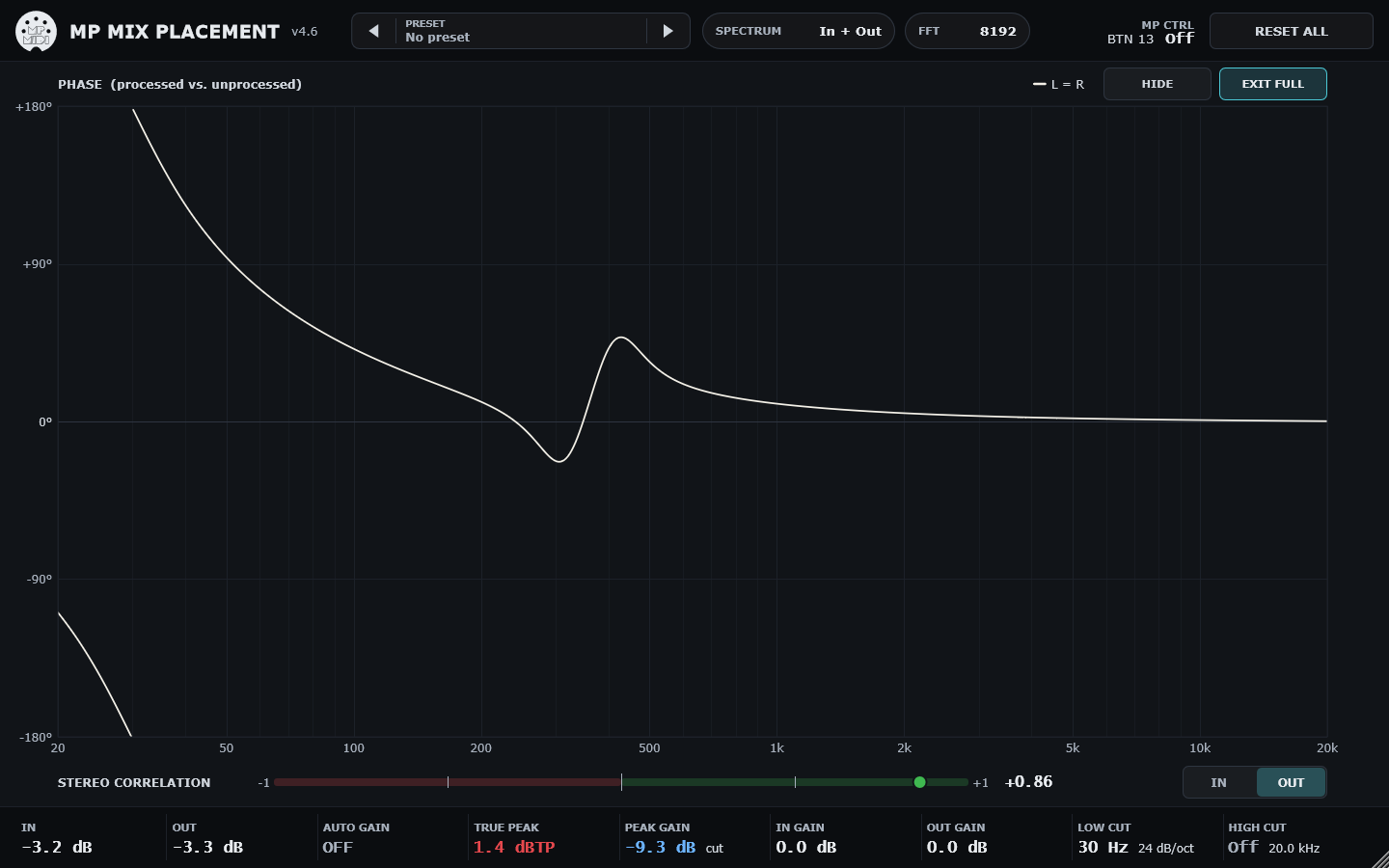
Figure 17. Phase panel in FULL view.
13. Presets
13.1 The header button
13.2 The presets page
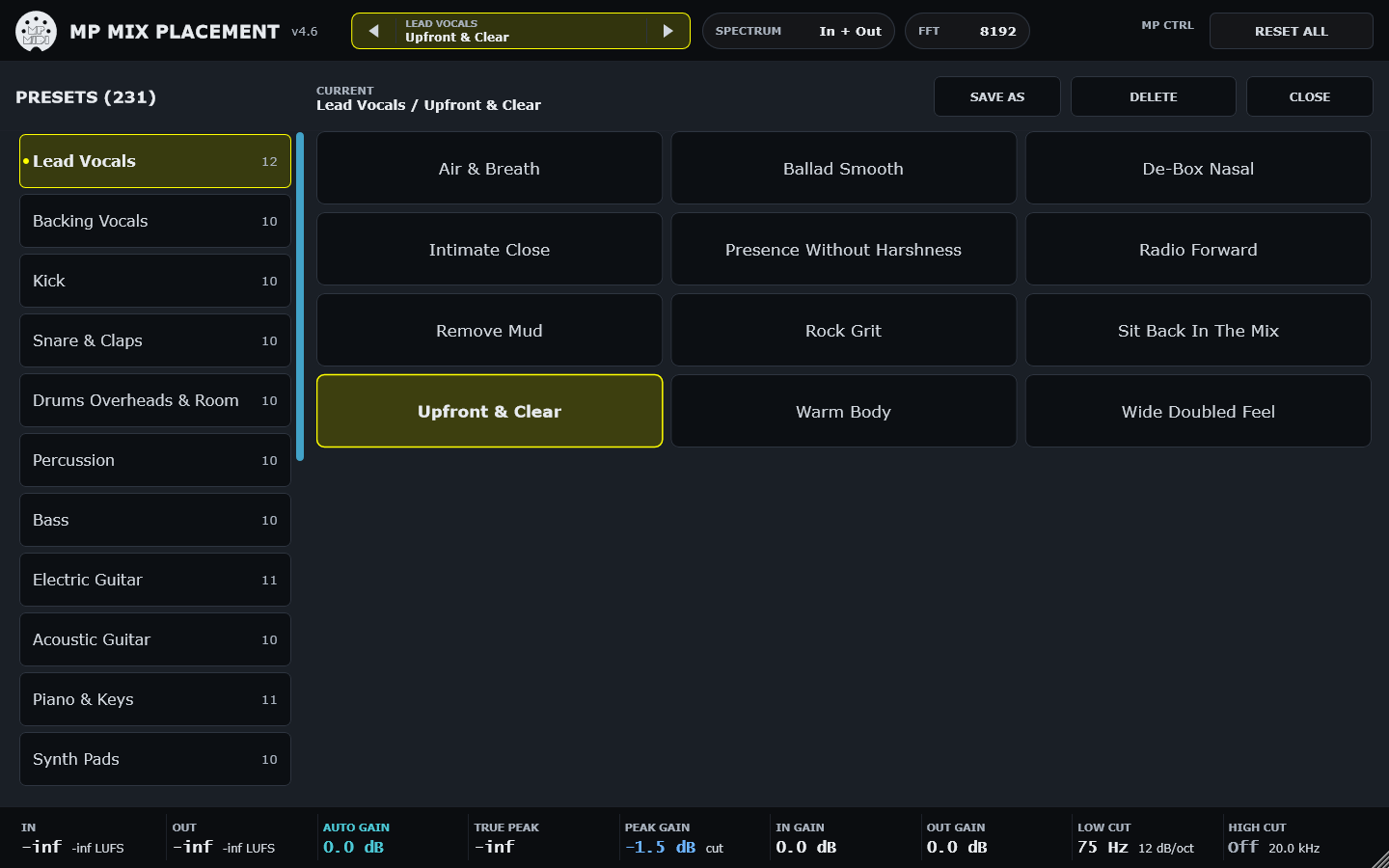
Figure 18. The presets page.
- Categories (left) with the number of presets in each; the dot marks the category of the current preset. Drag to scroll.
- Presets (right) tap a card to load it; the current preset is highlighted in yellow.
- SAVE AS type a name and tap SAVE; it saves into the selected category. The button shows OVERWRITE when that name already exists.
- DELETE deletes the current preset; tap twice to confirm.
- CLOSE returns to the graphs. The page follows the arrows and the preset encoder.
13.3 Files and categories
Presets are small files in %APPDATA%\MP\Host\MP Mix Placement\<Category>\<Name>.mpmix (macOS: ~/Library/Application Support/MP/Host/MP Mix Placement). Each folder is a category: create, rename or delete folders in Explorer or Finder to organise your presets. A preset stores only the controls that differ from their defaults. The factory presets are written once and never overwritten, and a deleted factory preset stays deleted.
| Category | Presets | Examples |
|---|---|---|
| Lead Vocals | 12 | Upfront & Clear, Intimate Close, Sit Back In The Mix |
| Backing Vocals | 10 | Behind The Lead, Wide Stack, Airy Choir |
| Kick | 10 | Punch Forward, Deep & Round, Tight & Dry |
| Snare & Claps | 10 | Snare Crack Forward, Fat Body, Remove Ring |
| Drums Overheads & Room | 10 | Overheads Clean Air, Overheads Wide, Tame Harsh Cymbals |
| Percussion | 10 | Shaker Airy Side, Tambourine Left, Congas Warm Wide |
| Bass | 10 | Defined Low End, Make Room For Kick, Growl Forward |
| Electric Guitar | 11 | Rhythm Left, Rhythm Right, Make Room For Vocal |
| Acoustic Guitar | 10 | Strum Bright & Wide, Fingerpicked Intimate, Remove Boom |
| Piano & Keys | 11 | Piano Clear In Mix, Piano Behind Vocal, Piano Wide Stage |
| Synth Pads | 10 | Pad Wide Background, Pad Out Of The Vocal, Pad Dark Bed |
| Synth Leads & Arps | 10 | Lead Cuts Through, Lead Behind Vocal, Arp Wide Sparkle |
| Strings | 10 | Strings Wide Section, Strings Behind Vocal, Strings Far Back |
| Brass & Winds | 11 | Brass Section Wide, Brass Tame Blare, Brass Behind Vocal |
| FX & Ambience | 10 | Reverb Return Clean, Reverb Return Wide, Delay Return Tucked |
| Depth & Distance | 10 | Very Close, Close, Slightly Back |
| Stereo Placement | 13 | Wide Subtle, Wide Medium, Wide Extreme |
| Make Room | 12 | Room For Lead Vocal, Room For Kick, Room For Bass |
| Character & Saturation | 10 | Warm Tape Lows, Mid Bite, Air Exciter |
| Mix Bus & Mastering | 11 | Gentle Smile, Clarity Lift, Warm Glue |
| Lo-Fi & Special | 10 | Telephone, AM Radio, Megaphone |
| Dialogue & Podcast | 10 | Voice Clear & Present, Broadcast Warm, De-Box Room Mic |
Table 8. The 231 factory presets in 22 categories.
13.4 The preset encoder
Encoder 31 steps through the presets one at a time. While you turn, the header shows the preset under the encoder with RELEASE TO LOAD; it loads once the encoder has rested for 300 ms, so turning through the list never loads every preset on the way. The encoder covers the presets that existed when the plugin was loaded; presets saved later are reachable with the arrows and the page at once, and by the encoder after the plugin is reloaded.
A project stores its own settings and the name of the preset in use. Reopening a project restores the settings exactly; it does not reload the preset file.
14. Placing a mix: a workflow
- Set the balance first with faders. Insert MP Mix Placement on the parts that compete. Leave Auto Gain on.
- Find the conflicts. Solo two parts in the DAW and listen for the region where they mask each other; in MP Mix Placement, solo bands to hear what lives where.
- Make room. On the supporting part, load a Make Room preset (or cut 2-3 dB in the shared bands). On the lead part, boost its identity bands by a similar amount. Small, complementary moves work better than one big cut.
- Set depth. Use the Depth & Distance presets as a scale from front to back: lead parts Close or Very Close, supporting parts Slightly Back or Mid Distance, pads and ambience Far Back.
- Set width and side. Widen pads, backing vocals and doubles with the Stereo Placement or Wide presets; place rhythm parts left and right with the lows centred. Check the correlation meter on OUT: it should stay clearly above 0.
- Add character last. Drive individual bands where a part needs grit or weight. The level does not change, so the balance stays.
- Save what you like with SAVE AS into a category of your own.
| Headroom: Watch PEAK GAIN in the status bar while boosting: it shows the largest boost of the current curve (orange) or the deepest cut (blue), and TRUE PEAK shows the actual output peak (tap to reset). MP Mix Placement has no internal clipping; use Output Gain or Auto Gain to keep headroom. |
|---|
15. Settings, files and troubleshooting
| Item | Details |
|---|---|
| Window size | Resize from the corner (minimum 1024 x 760). The size is kept per instance and remembered for new instances in %APPDATA%\MP\Host\MP Mix Placement\settings.xml. |
| High CPU | Make sure the plugin is a Release build. Each band with Drive above 0 adds about 1 % of a core at 44.1 kHz. |
| No processing, nothing changes | Check PROCESSING OFF in the header, the licence message, and the sample rate: outside 32-384 kHz the plugin passes the audio through unprocessed and says so on the screen. |
| Encoders flash on preset change | They should not: presets are sent to the host as value changes, not as touches. Hovering over or touching a GAIN / PAN box deliberately flashes its encoder. |
| Encoder does not reach a new preset | Reload the plugin; the encoder list is fixed for the session. |
| Surround tracks | Only mono and stereo are supported. |
Table 9. Settings and troubleshooting.
Appendix A - Specifications
| Specification | Value |
|---|---|
| Bands | 14: low shelf 88 Hz; band-pass 125, 175, 250, 350, 500, 700, 1000, 1400, 2000, 2800, 4000, 5600 Hz; high shelf 7 kHz |
| Band controls | Gain +/-18 dB, Pan L100-R100 (balance), Mute, Solo, Drive 0-100 % |
| Global controls | Input / output gain +/-24 dB; low cut 10-1000 Hz and high cut 1-22 kHz, 6/12/24/36/48 dB/oct; Auto Gain; Processing On/Off; Smoothing 5-100 ms |
| Engine | Natural: minimum-phase FIR (8192 taps at 44.1/48 kHz) designed from the target curve, zero-latency partitioned convolution, 64-bit floating point |
| Latency | 0 samples |
| Sample rates / channels | 32-384 kHz; mono or stereo |
| Meters | Peak, momentary loudness (BS.1770), true peak (BS.1770, 4x), stereo correlation, peak gain |
| Parameters | 81 host parameters, grouped per band; stable IDs |
| Presets | 231 factory presets in 22 categories; folder-based user library |
Appendix B - References
- S. P. Lipshitz, J. Vanderkooy, "In-Phase Crossover Network Design," J. Audio Eng. Soc. 34(11), 1986.
- S. Linkwitz, "Active crossover networks for noncoincident drivers," J. Audio Eng. Soc. 24(1), 1976.
- A. V. Oppenheim, R. W. Schafer, Discrete-Time Signal Processing, ch. 13 (cepstrum, minimum phase).
- W. G. Gardner, "Efficient Convolution without Input-Output Delay," J. Audio Eng. Soc. 43(3), 1995.
- V. Valimaki, J. D. Reiss, "All About Audio Equalization: Solutions and Frontiers," Applied Sciences 6(5):129, 2016.
- J. Ramo, V. Valimaki, B. Bank, "High-Precision Parallel Graphic Equalizer," IEEE/ACM TASLP 22(12), 2014.
- B. van Leer, "Towards the ultimate conservative difference scheme II," J. Comput. Phys. 14, 1974; P. K. Sweby, "High resolution schemes using flux limiters," SIAM J. Numer. Anal. 21(5), 1984.
- V. Zavalishin, The Art of VA Filter Design, rev. 2.1, 2018 (TPT filters for the low and high cut).
- J. D. Parker, V. Zavalishin, E. Le Bivic, "Reducing the Aliasing of Nonlinear Waveshaping Using Continuous-Time Convolution," DAFx-16, 2016.
- ITU-R BS.1770-4, Algorithms to measure audio programme loudness and true-peak audio level, 2015.
- J. Blauert, P. Laws, "Group delay distortions in electroacoustical systems," J. Acoust. Soc. Am. 63(5), 1978.
- H. Moller et al., "On the audibility of all-pass phase in electroacoustical transfer functions," J. Audio Eng. Soc. 55(3), 2007.
Moog and 914 are trademarks of Moog Music Inc. MP Mix Placement is an independent product by MP MIDI, inspired by the Moog 914 Fixed Filter Bank. It is not affiliated with, endorsed by or licensed by Moog Music Inc., and it is not an emulation of the original circuit.