
7. Automation in the DAW
Single MPH Automation
The MP Single Host reports the parameter names of the hosted plugin (ie Cutoff, Resonance etc). The parameters to be automated need to be linked on encoders so that they can be reported to the DAW.
In Ableton Live, you click on Configure and move the parameters with an encoder or the mouse and it will appear on the plugin area, as usually done with any other plugin.
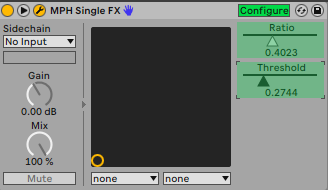
(Ableton Live update: If you are using the AU version of the MPH you need to have one automation point before recording automation in Ableton Live, in VST3 this is not needed)
Multi Host Automation
The MP Single Host reports the plugin and parameter names of the hosted plugin (ie Cutoff- Sylenth1, Resonance - Sylenth1 etc).
The parameters to be automated need to be linked on encoders so that they can be reported to the DAW.
In the latest release of February 2026 the automation method that sets automatable parameters in the Multi Host has changed. See at the bottom of this document the section that describes the new method to set automatable parameters.
In the Multi Host, you need to set in the ENCODER OPTIONS the parameter ID to be automated. This is the number with red font on the bottom right corner in the ENCODER OPTIONS (see below).
To automate in the Multi Host, click ENCODER OPTIONS, there are 2 options:
1. The automated method
From the right click menu select "Set parameter ids" and it will automatically assign ids to all encoders that have been linked but don't carry an automation id.
This option works per plugin slot and the ids will continue to increase from slot to slot. For example, if you have linked 4 parameters in the first slot, then it will use ids 1 to 4. On the second slot it will use ids 5 and onwards.
In Ableton Live, you click on Configure and move the parameters with an encoder or the mouse and it will appear on the plugin area, as usually done with any other plugin.
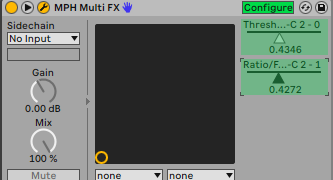
2. The manual method
set an ID in the red box from 1 to 128, 0 means automation is disabled and it’s the default value.
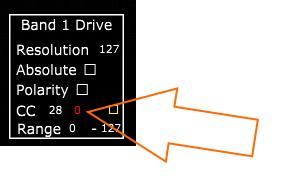
Once you set the parameter number, move the parameter so it is being recognized by the DAW (like you would normally do automation without the MPH) and that’s it. You can only use one automation ID per encoder. If you enter an automation ID number (1 to 128) that is already used you will get a pop up notifying you where that id is being used so you can use another one. When saving a multi host preset the automation IDs are not saved in the preset.
Single Host and Multi Host automation demostration video in Logic Pro (applies to all DAWs).
In the case of the Multi Host, you will notice that you cannot assign an automation ID (it is greyed out) on encoders that have been linked with a parameter which has been linked on an encoder in another page. This is done to prevent reporting the same parameter to the DAW as an automatable parameter.
For example, if you link the Attack parameter in page 1 and then link it again in page 2, you don't need to enter an automation id on the encoder in page 2. You will see that the id field is greyed out and it will use the automation id from page 1. This way we report only one time the parameter to the DAW and avoid conflicts.
For linking the same parameters in multiple pages see here
Update: In the v16-2d9a51a2--H2023-12-19--B2023-12-19 version of the MP Host, it reports the names of the plugin parameters to the DAW for automation.
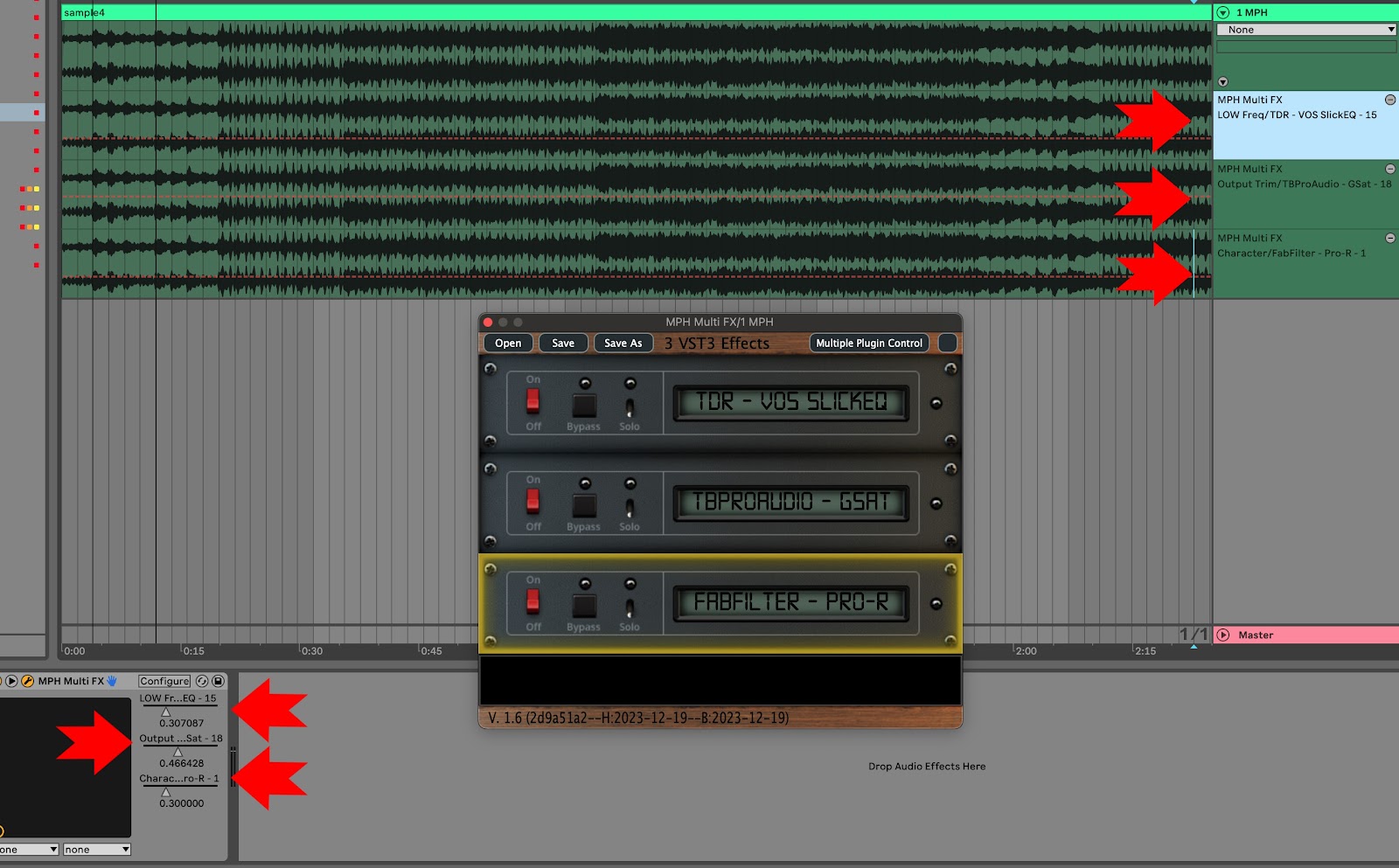
Setting automatable parameter in the Multi Host (February 2026 Release and onwards)
Since the introduction of Automap, setting the IDs of all linked parameters to be automatable would soon exhaust all 128 available parameter slots available for all Multi Host slots. For example, if you load Fabfilter Pro Q in the first slot with Auto map enabled, then "Set Parameter IDs" to mark all linked parameters IDs as automatable would leave no room for additional slots to be automated.
Therefore, we introduced a new way to set manually the parameters you want to automate in your DAW.
Right click on an encoder to view the Color Selector. There you will see a checkbox "Automatable". When you check the box, the parameter is reported to the DAW as automatable parameter and gets a rainbow outline, so it is obvious that it is set as automatable.
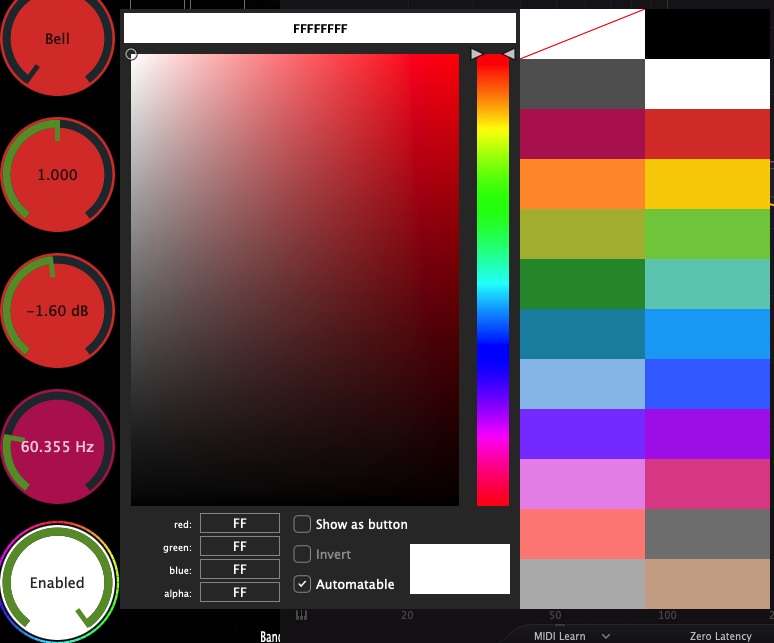
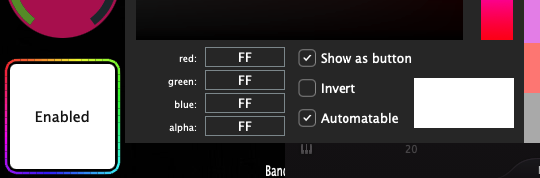
The Automatable parameters are saved in the MP Host preset, (SIngle Host preset and Multi Host preset) so the next time you load that preset, parameters set as automatable will be recalled.
Overwriting Automation in Cubase and Nuendo.
If you have automation already written in a track, enable the Auto Latch mode to write new automation over it. Press F6 to open the Automation Panel. In Nuendo, use Auto-Latch or Cross-Over mode whether there is automation or not.
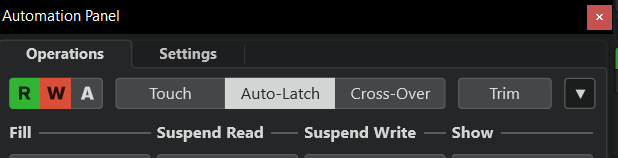
When you use Auto Latch:
- As soon as you touch a parameter Cubase ignores existing automation
- It starts writing your new values
- After you release, it keeps writing the last value (this is the “latch” part)